VirtualPC inside a VirtualPC?

Kimberly Tripp mentioned this little funny in her SQL Server 2005 pre-conference session at TechEd this year (blogged about here).

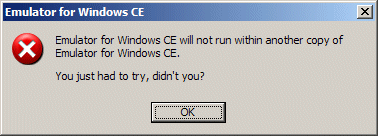
Kimberly mentioned a funny error message that would appear if you try to run a mobile application via Visual Studio that’s installed in a Virtual PC image. Given that the mobile device emulators are themselves essentially virtual PCs, this shouldn’t be too surprising…but the error message is, well, humourous to say the least.

Chris Hart saved me the effort of installation, etc. and provided this image:

unlucky for some

DHTML Lemmings

Jonathan’s post about Asynchronous JavaScript with XmlHttpRequest (AJAX) caught my eye. As noted in Jonathan’s post, using the XmlHttpRequest object isn’t new…it has been available in Internet Explorer for a long time, certainly since late 1999/2000. Indeed, it is only now that other browsers are appearing on the scene and more of us find ourselves with always-on Internet connections that AJAX comes of age. Like Jonathan, I’m looking forward to getting my hands dirty with it, very soon. There’s more about AJAX-based applications over here.

I also found a link to DHTML Lemmings in Jonathan’s post…uh oh, I can see hours of my time going out the door…I overplayed Lemmings when I had it for my Archimedes during the late 80s and early 90s. Ok, ok, Jonathan’s post title did mention it too, but I didn’t think the game would be this realistic.

Move over Patience and Solitaire, your days are numbered.

unlucky for some

DeveloperDeveloperDeveloper – the return

Saturday 22nd October 2005 – Save the date!

The second DeveloperDeveloperDeveloper day is coming!

Like the first event, it will be held at Thames Valley Park (TVP), Reading, UK.

Call for speakers: If you are interested in delivering a 60-75 minute session or even a 30 minute session, please let me know: craig@scottishdevelopers.com

We’re open to your choice of topics, but given the close proximity to the Visual Studio 2005, SQL Server 2005 and Biztalk Server 2006 launch on the 7th of November, we’re happy to take topics for those products too. This is a Community Community Community event, so product plugs/marketing sessions might not go down too well.

We going to cater for all levels: if you are a “wanna-be” speaker, this is your chance to shine, we can guarantee an informal, relaxed environment, and will give you all the support you need to promote yourself to the next level. If you’ve never spoken at a developer event in the past, this is your chance! 30 minutes is very easy to fill! We’d love to hear from you!

There is a good chance that the sessions will be put to the community for selection/voting, i.e. the sessions will be Chosen By Developers, chosen by you.

Watch this blog, amongst others, for further announcements!

Can’t wait!

TechEd 2005 – Being more productive in .NET

Juval Lowy – some session!

We kicked off with a look at the under-used WinCV.exe class viewer (something that Delphi has enjoyed for some time now…). Juval compared a search for ‘object’ using the WinCV class viewer and a search on the MSDN. He referred to the class viewer as “intellisense on steroids”.
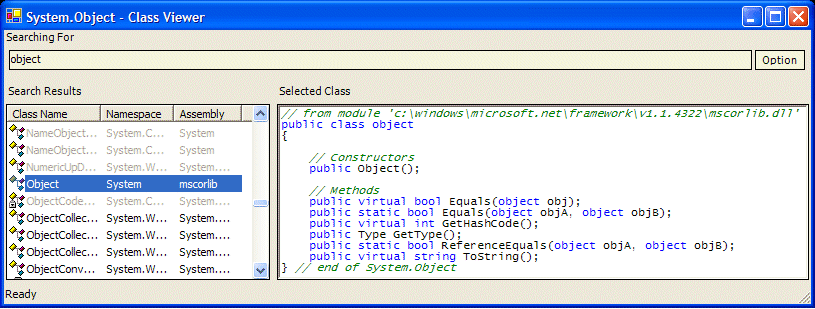
WinCV
WinCV at work – it has incremental search too

WinCV is available today, you can find it here:
C:\Program Files\Microsoft Visual Studio .NET 2003\SDK\v1.1\Bin

However, if you are looking at Visual Studio 2005 betas, you’ll find it’s built in to the product. Take a look at the View –> Code Definition Window menu option:

Code Definition Window

Tied in with this, Visual Studio 2005 has a right-click menu option “Go To Definition”. This works very much like Delphi’s ability to turn methods and properties into URLs when the control key is pressed…in which case it has been a Delphi feature for a long time now!

Conditionals via the System.Diagnostics namespace

// I must change my WordPress theme such that it respects code a little better :-(
#define MySpecialCondition //usually DEBUG

public class MyClass
{
public MyClass()
{}
[Conditional("MySpecialCondition")]
public void MyMethod()
{}
}

//Client side code
MyClass obj = new MyClass();

//This line is conditional
obj.MyMethod();

Link File
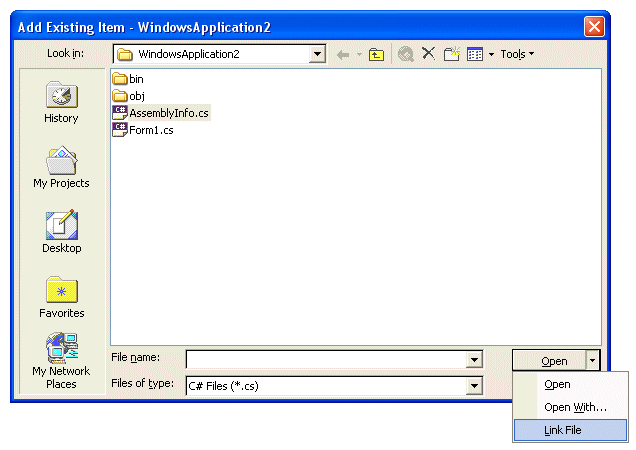
Interestingly, and this is something that I’ve preached about during my TDD presentations, Juval went on to remind us about the little drop-down menu that is attached to the Open menu:
unlucky for some
Open –> Link File is useful

If you’re anything like me, you’ll hate having to copy classes/files between projects. Indeed if you download any of the TDD examples, you’ll see I make copious use of the Link File option to share a class between more than one project. In Juval’s words: [Link File] “References the file for compilation purpose, but does not copy it”.

Starting more than one project
One thing that did catch my eye was Juval demonstrating “multiple start up projects”. It’s tiresome when building client/server applications that we find ourselves starting the server, then running the client. The screenshot below can be reached via right-clicking on the Solution item inside the Solution Explorer, then choose Properties (Visual Studio 2003/2005):

multiple startup projects
Multiple startup projects…very handy

Beware of the false Finds!
Personally, I love Visual Studio’s folding editor: the ability to mark sections or regions of code and hide them away is long overdue! However, when a piece of code is folded away, pressing Control-F to perform a Find operation can lead to surprising results. Code that is folded can be included or excluded from the Find dialog’s operation, i.e. Find operations that you expect to be successful, aren’t. By default in Visual Studio 2003, the Find dialog ‘Search hidden text’ check box is unchecked…therefore you may not find what you are looking for, even though you know it’s there! In Visual Studio 2005, the checkbox is checked.

Name those threads!
Presented as being useful during debugging, naming threads is remarkably simple (apologies for the VB code):


Imports System.Threading

Dim currentThread As Thread = Thread.CurrentThread

Dim threadName As String = "Main UI Thread"
currentThread.Name = threadName

Peculiar Selections
Oh, and rectangular text/code selections? You need to hold the ALT key down whilst dragging (works in both Visual Studio 2003 and 2005). This is a feature you either love or hate, but as Juval says: “Very useful in removing namespaces and repeated definitions “.

This and That
Visual Basic has been blessed with the My class that provides access to a multitude of things, such as Audio, Keyboard, Mouse, Network, etc. Perhaps because C# developers are deemed smarter than Visual Basic programmers (I’m already ducking!), C# doesn’t have the My class. Until now at least. Juval has spent some time working on an implementation and he was keen to demonstrate it to us. So, given that Visual Basic has “Me” and “My”, C# now has “This and That“, I jest you not:

This and That

Download this and that.

And finally…
This was a really good session that presented a lot of the differences between Visual Studio 2003 and 2005 and did so by means of lots of demonstrations. Juval was a little quick at flicking between the PowerPoint slides and the Visual Studio IDEs for my liking, something I found he did in another session too – don’t let that put you off, he’s a good speaker and won’t let you down technically. You’ll find Juval blogging about Lornhorn.

Juval left us with a pointer to his coding standard, available via www.idesign.net.

He also mentioned that his book is undergoing a revision and should be with us this month, Programming .NET components, 2nd Edition, Juval Lowy, O’Reilly 2005:
PM#3 – Use e-mail properly

E-mail can be a hinderance for three reasons:

  1. Unless you are very strict, most folks find themselves checking e-mail more than three times per day. This is especially true if your e-mail application has a notification facility whereby you see and/or hear new e-mail arriving. It’s very difficult to resist the urge to go and read new e-mail. Worse, in open plan environments, it’s possible to hear other peoples’ new e-mail arriving.
  2. E-mail, as an application, has history, it has etiquette, it has a modus operandi. Very few people, in my humble opinion know how to make good use of e-mail. This is especially true for “newcomers”, i.e. those folks who have joined the e-mail bandwagon late and don’t realise that there are written and unwritten rules that should be understood (notice I don’t say ahered to, rules can be broken if the timing is right, but that’s another posting!)
  3. E-mail has no real means of helping us manage our to-do list, it doesn’t help us manage those e-mails that require us to respond to, nor does it help us manage those e-mail for which we are awaiting a response. As project managers, we find ourselves dealing with collections of issues, requests for information, decisions, etc. How do we solicit such data? We use e-mail. How do we track who has responded and who hasn’t? Suddenly it becomes very difficult.

One of the e-mail rules that I like to adhere to however, is one that is all too often broken by others. If you find yourself in the CC section of an e-mail, i.e. not in the TO section, this typically means that the e-mail, for you, becomes a FYI…for your information. Your response, unless solicited directly in the e-mail, is not required. Should you choose to offer a response, you should apologise for interjecting from a CC.

Managing by e-mail is also rather difficult. I know some folks work on a “zero in-box” policy whereby e-mails are converted to tasks (we’re talking about Outlook here) and thus you have a prioritised list of things to do. This works, however I think the problem of information management, and e-mail falls into this category, is a much more difficult arena, and one that is not served by a killer application. Of course, managing all this properly brings with it the need to classify, attribute, associate, infer, etc. links between items, prioritise items, and so on. Whilst work is being performed in this area, all we can do today is learn to use e-mail properly.

Don’t let e-mail rule your life – you don’t need to check your e-mail more than three times per day (if somebody tells you that they have just sent you an e-mail that requires your attention, you may of course check your e-mail in between times!)

Do try to keep your immediate in-box cleared down to a reasonable size, I prefer to have less than 20 items “in my face” when my e-mail client(s) start up. Use folders and colour-coding (if available) to help you sort’n’prioritise – not to the point that it overcomes point 3 above. Generally speaking, I’ve noticed that I have very few e-mails whose lifespan is more than 7-10 days – as such, I have a folder “older than 10 days” which can be used as a manual dumping ground, or automated via a rule. Your threshold may vary, but try it, you may be surprised.

You don’t need to keep all trivial e-mails, move them to a “trivial” folder, or better still, delete them.

I will often include myself in the CC list of an e-mail. This allows me to clear out my sent items folder fairly frequently. If your e-mail client offers you “sent item”-specific features, such as delivery/open tracking, this might not be an option for you (but only if such tracking is required).

In this series:
PM#11 – Management By Shouting Loudest (MSBL)
PM#10 – The truth is best…admit it…
PM#9 – Avoid duplication of effort
PM#8 – Multi-tasking is evil
PM#7 – High workload means lower productivity…
PM#6 – You were right and I was wrong
PM#5 – Whose schedule is it anyway?
PM#4 – Start it…finish it
PM#3 – Use e-mail properly
PM#2 – Focus on the project
PM#1 – decision making

TechEd 2005 – IT Blogging

Microsoft’s Betsy Aoki and Eileen Brown gave an excellent Chalk’n’Talk session that was well attended and enjoyed a moderate amount of interaction. This session was preceeded by Betsy’s session about MS IT Microsoft’s Blogging Engine – Construction and Delivery, blogged about here.

Being a Chalk’n’Talk, slide content was limited and was required merely to spark discussion.

Here are some of the things we discussed, with my notes underneath:

What’s a Blog/Why Blog?

Inside/Outside Reach

Customers talk back
Blogs are a great way for your customer to talk to you – but make sure that you don’t become their personal support specialist!

Remember no “Flogs”
This made me chuckle: the guys over at http://www.falafelsoft.com/ use flogs instead of blogs!

Present yourself as resource and aggregator

How do blogs differ from forums/newsgroups/chats?
I’m not sure if we discussed this to completion, I’ll need to check the audio. However, for me, I blog because:

  1. RSS/Atom feed creation is free.
  2. RSS/Atom provides an easy subscription mechanism for my readers
  3. I can access my blog from anywhere, as TechEd’s wireless connectivity demonstrated
  4. no FTP is required, which means I could blog from behind a firewall
  5. it [the blog] pushes content out
  6. content keywords add Google fodder that promotes ranking and facilitates easier searching
  7. content can be short and focussed
  8. there’s much less noise than nntp

Does blog platform matter: yes and no

Consider small audiences and Steve Ballmer: who do YOU want to reach?
“Leverage the power of the small audience”, Betsy Aoki – good quote: you may only have 20 folks reading your blog, but if they are your 20 best customers…

What to Post

Consider “ego searches,” post longevity

X-casting and alternative delivery mechanisms

Link generosity and becoming a human Aggregator

Corporate credibility
This topic reminded me of this and this.

Fighting comment spam

Gaining readers: promotion/tagging/search discoverability
Eileen noted that a simple spelling mistake in one of her posts resulted in a huge number of hits.

Spiders and Bugs

An audio recording of this session can be found here: http://podcasts.msmobiles.com/?p=73 .

Further information:
IT learns to tune out blogging’s white noise
Blogcasts: Coming soon to a computer near you
Microsoft uses blogs to reach out to IT community

How To Blog And Not Lose Your Job

eXtreme .NET and Web Services – TechEd speakers hit Scotland!

July 21st – TechEd speakers come to Scotland!

I caught up with Christian Weyer at TechEd 2005 last week, he’s a great guy…and he’s coming to Scotland next week to deliver his “‘Add Web Reference’ Reconsidered: Implementing Web Services the Other Way” session.

And Dr. Neil Roodyn will be presenting his “eXtreme .NET – An Introduction to Better Software Development” session.

Extreme Programming (XP) and web services on the same agenda – it doesn’t get any more up to date than that!

Interested? There’s more information here: http://www.scottishdevelopers.com/modules/news/article.php?storyid=86

I hear that a free copy of Visual Studio 2005 beta 2 DVD pack will be given away to every attendee! (in addition to a free CodeZone gift!)

There’s also talk of a hillwalk on the 22nd of July…

TechEd 2005 – MS IT Microsoft s Blogging Engine – Construction and Delivery

Microsoft’s Betsy Aoki gave us a great session explaining all about “blogging at Microsoft”. Initially, during 2003/4 there were only 5 bloggers using BlogX, after PDC a further 200 signed up and within a year there were over 1000…mainly using .Text. Currently, Betsy manages of 1600 Microsoft bloggers split between blogs.msdn.com and blogs.technet.com (and a handful of other employee-specific sites).

Those of you who are avid bloggers and follow Microsoft blogging closely, will know that Microsoft have gone through a few blogging engines in their time so far. Initially, some Microsoft bloggers used BlogX. This was followed by .Text and now by Community Server 1.0 (written by Scott Watermasysk and Telligent Systems who are lucky enough to be able to say: “Writing blogging software is our day job now!” I’m only jealous!)

Betsy played a pivitol role in the migration to .Text and the subsequent migration to Community Server 1.0. When migrating from one engine to another, it’s worth considering how refferals might work: consider setting up 304 redirects for the RSS feeds. Raymond Chen‘s blog took over 30 minutes to port from .Text to Community Server…mainly due to the vast number of referrers!

Betsy noted some of the problems peculiar to a blog site. Particularly:

  1. Skins are absurdly important. You would think content was the important thing, no, it’s the look’n’feel. How long did you spend looking out the theme/skin for your blog?
  2. Microsoft employees want to blog: Wherever, whenever. Initially, Microsoft bloggers were a little reluctant to blog, stating “you want me to blog and do my day job”. Now, and this was evident in this session and Betsy and Eileen’s session (more later), Microsoft bloggers can’t get enough of it. Folks are on the ‘phone complaining when they can’t get to their blog…it’s an addiction (a soft one luckily!)

I was interested to learn that Microsoft don’t have an official blogging policy, but they do offer advice on “how to blog” and particularly, “how to blog smart”. Robert Scoble is noted as “setting the scene” and “driving it forward”. Betsy explained that Microsoft don’t have a blogging policy because they don’t want their employees to feel constrained, nor do they want blog readers to believe that employees are being told what to write…i.e. blog posts become a marketing device. So it seems that good stuff doesn’t always need policy.

I enjoyed this session, it was delivered well and gave me an insight into something most of us take for granted…I mean, blogs.msdn.com just appeared…did it not?

There is a recording of the session here: http://podcasts.msmobiles.com/?p=74
and a related news item at the msmobiles.com portal can be found here: http://msmobiles.com/news.php/4017.html

PM#2 – Focus on the project

In Vienna, April 2004, Ken Schwaber, co-founder of Scrum said to his class:

“Don’t procrastinate, do something, no matter how small…something that moves the project forward”

I’ve kept that quote close to hand ever since. In fact, I even use it in my Scrum presentations (more here – registration required)

The crux behind “Focus on the project” is this:

We all suffer from an uncanny ability to be sidetracked or to be distracted. This is not good for the project.

Distractions, as Clarke might say, are evil. I certainly agree, distractions are the work of the Devil.

I find myself distracted by a number of things (apologies if these sound like rants…they are sort of!):

  1. Passers by. I’ve been travelling a lot over the last 18 months, so when I get back to my desk I’m invariably greeting with the response “oh, you’re back…”. And being an IT guy, the next question, after the usual exhchange of pleasantries is “…I have an Excel problem…have you got a minute?” (Of course, sometimes it’s Word!) As noted earlier, “a minute” usual means five. Getting back to what I was doing after a five minute gap can be a chore.
  2. The telephone. The telephone’s great for getting quick decisions and I favour it over a series of e-mails (this is the subject of a future posting). However, just because I have chosen to answer the telephone, typically out of politeness, it doesn’t mean that I’m at your disposal. Please ask me: “is now a good time to talk?” or “do you have time to talk?” Better still, if you’re call isn’t that important, send me a single e-mail asking me to call you when I’m ready. Telephone interruptions tend to be continous, once a caller realises that you are already on the the ‘phone, they’ll tend to keep trying until they get through. Apart from the obvious waste of time and resource, it means you suddenly end up with two (or more) ‘phone calls back-to-back. This is really frustrating as it feels like you’re destined not to get on with the task in hand, i.e. focus on the project.
  3. Folks who don’t realise the importance of what’s being done. I’m sat here in my study typing this post, to all extents and purposes in the eyes other folks, it’s something that can be done later…because all I’m doing is staring at the monitor. Creativity doesn’t work 9-5, it doesn’t always manifest itself in swish graphics on the screen or reams of fancy looking text. Similarly, it’s the weekend…my deadlines have been published for long enough now, but still I’m just perceived as sitting in the study twiddling my thumbs…my to-do list isn’t at all important!
  4. Doing something for doing something’s sake. It’s nice to get ticks in boxes, little jobs complete, but ask yourself: “how important was that tick in the box activity?” It might have been important to somebody else who needed the tick in the box, but did it really help the project? There comes a time in a project when a particular avenue is closed off and another route has to be examined. Some folks will expect the original avenue’s work to be completed such that proper closure can be achieved. Invariably, you’ll find yourself creating documentation or doing work that will not be used and merely gets the requestor a tick in the box – this kind of distraction does not help the project and serves to slow to you down.
  5. Poor use of e-mail. A future posting will cover appropriate use of e-mail…as a distraction, “e-mail ping pong” is a real pain. E-mail is a great tool, but some folks treat it as “work postponement device”. This scenario typically occurs when you pass work on to somebody, you may spend some time crafting a very succinct e-mail making sure that you pass the request/work over neatly. Imagine your surprise when the reply comes back very quickly with a question that essentially passes the work content back to you? I’ve seen this trick referred to in other postings as “sloping shoulders” – the uncanny knack of not accepting a work package! I’ve also seen this scenario referred to as “answering questions with questions.” The distraction element occurs as you have to read the question and then re-plan the distribution of that particular work package.
  6. Too much work. Yes, I agree, this is a strange one. I find myself, and see others, being distracted because they’ve got too much work to do. In this distraction scenario we find ourselves flitting between tasks/activities, not really focusing on any task for too long. We essentially fall into the “multi-tasking is evil” camp, but that’s another blog post (#7, in draft format, coming soon).
  7. Too much travel.
  8. Travel takes its toll; downtime in airport departure lounges can be harnessed, however invariably, I find myself fidgetting and wanting to get on with some work, i.e. move the project forward. However, I usually end up reading a technical book, or a novel (this is sometimes better as it frees the mind, allowing the subconcious to “do what it has to do”) I’m a great believer in conference calls and LiveMeetings for bringing folks together “face to face”.

In summary…
Do what you have to in order to reduce the number of distractions that are plaguing you. Make large chunks of uninteruppted time available to you and your project – it’s the only way you can make significant and productive progress.

Even if you publish your deadlines and to-do list, sometimes you will find that you need to reinforce the importance of it to others.

Alway ask youself, “is what I’m currently doing helping the project?” If it’s not, then it’s periphery and you should re-prioritise your work basket.

It’s not just about “you” focusing on the project, it’s also about getting the project team to buy-in to a similar focus otherwise you’ll find yourself threading water (if you’re lucky). I know it’s difficult, but if you have folks on your project who have interests other than the project in hand, it’s important to have them drop that interest such that they can focus on the current project.

In this series:
PM#11 – Management By Shouting Loudest (MSBL)
PM#10 – The truth is best…admit it…
PM#9 – Avoid duplication of effort
PM#8 – Multi-tasking is evil
PM#7 – High workload means lower productivity…
PM#6 – You were right and I was wrong
PM#5 – Whose schedule is it anyway?
PM#4 – Start it…finish it
PM#3 – Use e-mail properly
PM#2 – Focus on the project
PM#1 – decision making

Agile:Rant: If you do some of the work…

Here’s a snap of the peaches we bought from our local big-name supermarket:

unlucky for some

“Ripen at home”. What’s that all about? I have to do some of the work here…and I’m still paying the same price. I don’t see any payback when I get to the checkout, what’s going on here? Does this mean I’ve bought a product that isn’t ready to use when I get it home?

Surely they should be cheaper? After all, they’re getting picked earlier, thus freeing up space on the peach tree for the next lot, thus…oh, I see, early release means earlier return on investment (and in this case earlier repeat growth). May be we software folks could learn something from this…

Incidentally, I’ve just realised what I’ve done here – I’ve provided some meaningful hints about this posting in the title (agile:rant) and in the categories (project management, rants)…this is exactly the conversation Korby and I had during TechEd 2005. Thoughts on classification, attribution, taxonomy, intelligent searching…coming soon.

TechEd 2005 – E-mail or blog?

A couple of years ago we were all happy exchanging e-mail addresses…this year, it seems that all I did was exchange blog addresses.

Why the sudden interest in blogs? My first few thoughts on this are: Blogs open us up to our readership, they provide a means of working out how somebody ticks. Couple this with the fact I can publish information about “a topic” and push it out to the world…no longer do I have to rely on somebody sending me an e-mail to which I then have to reply (actually, it’s easy to rely on somebody sending me an e-mail, the bits that’s hard is for the sender: I might take an age to reply.) Blogs alleviate this “waiting game” – if the information is published via a blog, it’s there and waiting for others to read. I find this rather interesting, so I’ll blog some more about this topic as soon as I have some content.

Here are the blogs of a few of the folks I met:

Korby Parnell. Korby’s got a lot of good stuff to say, especially about GotDotNet – thanks for the t-shirt and badge, I’ll wear ’em at the next .net event! Korby, Adrian Bateman, Maarten Visser (more here) and I had a late lunch followed by a very lengthy chat on Friday – we were discussing taxonomies, specialisation, association, adding meaning to searches, etc. The chat went on through the afternoon until we reached a point that we all had to split and head our separate ways. Watch this space…there’s a huge work in progress here, if only we can find it and specify it.

Oh, and if you take a look at Korby’s blogroll, you should find that it follows my “separation theory”, as noted here.

Betsy Aoki. I missed Betsy at a recent UK Community Leaders LiveMeeting, it was good to catch her in a couple of sessions and to chat in between times. I’ll be blogging about Besty’s TechEd 2005 sessions later this week – I have written notes and drafts in place already. There was, just to give you a taster, much talk of Robert Scoble (good talk I hasten to add, just in case Robert is reading this! Hey, let me dream about something!)

Speaking of the Scobleizer…look what he just posted. Lordy!

Eileen Brown. Eileen has a really cool picture of herself on her blog: I was lucky enough to learn about the history behind the photograph. My primary reason for pinging Eileen was to chat about blogcasts…Eileen and John ran a great session for MVPs last month.

Benjamin Mitchell. I sat in on Benjamin’s WSE 3.0 session, which, despite the video recorder not functioning at the start, went very well. Obviously the faulty VCR wasn’t Benjamin’s fault and he did a good job of padding until a new one arrived! Benjamin was at my end of the table for dinner on Monday night so we chatted about “how we get things done”. Benjamin and I seem to share a common thread when it comes to “how much work do we take on” and “how much free work do we take on”. There aren’t enough hours in the day… Anyway, Benjamin, Peter McMahon, Durgaprasad Gorti Adrian and I manned the “Ask The Experts” stand for many hours on and off. From what I saw, Benjamin has the “Scott Hanselman desktop“!

Mat Stephen. Amazingly, when I got back to my desk and tried to add Mat’s blog to my aggregator it told me it was already there. True enough, it was mentioned during the aforementioned blogcast session…I even had it written down in my notes! Mat’s some guy, I met him in the flesh on the Thursday of TechEd, then on the Friday we shared the same coach to the airport. Whilst at the airport we knocked back 2 * 1.5L pitchers of lager! We were also joined by three guys from Ireland…the time at the airport just flew by!

Anyway, that’s TechEd 2005 over, I’ve still got seven or eight posts about it to finish…tomorrow (Monday) I go back to my day job, so it might be later next week before they see the light of day.

In the words of Betsy Aoki, when asked about Microsoft’s policy on blogging (there isn’t one, in case you were wondering – isn’t it amazing how some of the best work is done without a “policy” in place?): “code smart, blog smart”

TechEd 2005 – Viruses, Rootkits, Spyware and Malware

Mark is one of the guys behind SysInternals.

His session was littered with demo’s of spyware and malware at work – all running inside a virtual machine, so no harm done. Mark also demo’d rootkits and explained how they work – the concept isn’t new, but it’s only now we’re starting to see these things surface (and since rootkits are meant not to be seen, no pun intended, this might not be a surprise!)

The key takeaway was: “use more than one anti-spyware product”.

And if you’re using Windows XP SP2, always enable DEP (Data Execution Prevention). Here’s how.

I picked up some excellent tips and “fodder” for my soon to be completed and inaccurately named “The Seven Habits of Securing and Protecting Your PC” article…

Craig Murphy: author, blogger, community evangelist, developer, speaker, runner