Yet another instance of software that sucks…

Last year I lamented about how BT expected me to contact my administrator to solve their problem.

Tonight, whilst trying to book some flights via AirMiles, I stumbled upon this unbelievable error message:

airmiles.gif

Amazingly, I had used the drop-down menu to select London Heathrow. Even when using the “type destination” option that forces the correct destination airport to be selected, this error still appeared. And hey, where’s the magnifying glass icon on this page?

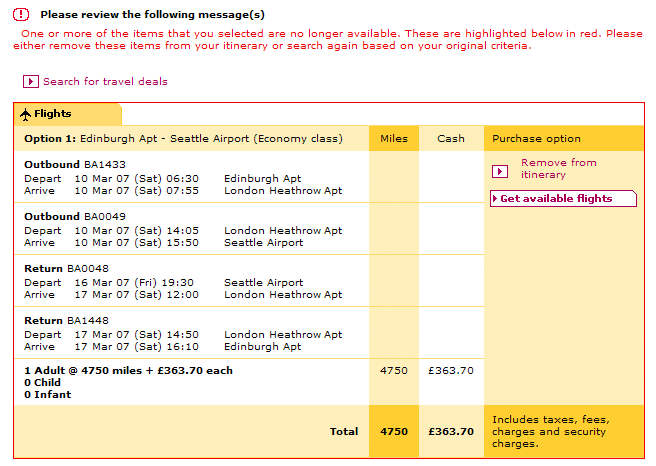
Frankly, this isn’t the first problem I’ve endured with this particular web-site. It’s virtually impossible to book British Airways flights through it. I ended up buying flights through BA.com because it was easier. Here’s the kind of nonsense it presents us with when we endeavour to pay for a flight:

airmiles1.gif

I wouldn’t mind, but there are no items “highlighted below in red”. Clicking on “Get available flights” and changing any or all of the flight combinations makes no difference. Personally, I don’t believe that “the system” should allow us to get this far if there are problems with availability – in fact, I’m sure there’s a conspiracy theory behind this.

Now, you might be thinking that I’m perhaps being a little harsh with this posting. Perhaps you’re right. However, since I went to the effort of writing to this particular flight vendor back in July 2006 when I endured my first failed booking, I got back a pretty nondescript response. Now that I’ve gone through the same pain again tonight, I’m going to be taking the matter up with them once again. However this time, I’ll bypass customer services and write to their top man. Be afraid.

Technorati Tags: , , ,

Vista, ReadyBoost – compability chart

ReadyBoost, one of Vista’s performance enhancing features, allows us to plug in flash memory (USB drives, SD cards, etc.)

The Lexar 512MB 40x Compact Flash card that I purchased for another purpose wasn’t fast enough, even when connected to my internal card reader (which may also be slowing things down a tad). So that led me to wonder just what is “fast enough” for ReadyBoost…and then I discovered that Grant Gibson has a great post covering ReadyBoost compatible devices.

More information can be found here.

Technorati Tags: , ,

WordPress Widgets and Google Adsense

I’ve upgraded my blog to use widgets and in the process upgraded a few other things to use widgets too.

I’m using Otto’s Google Adsense widget, it’s working very well.

Except, as you may recall reading here and here, there is an issue relating to the WordPress post preview and Google Adsense that could result in Google blocking your Adsense account.

I’ve not checked to see if the problem has “gone away”, but to be on the safe side, I’ve hacked Otto’s gadsense.php widget to prevent Google Adsense blocks from appearing in the preview. Here’s the code fragment that includes the hack, lines 10 and 12 are the ones to look out for:

[code lang=”php”]
function widget_adsense($args, $number = 1) {
extract($args);
$options = get_option(‘widget_adsense’);
$title = $options[$number][‘title’];
$text = $options[$number][‘text’];
?>

is_preview): ?>


Technorati Tags: , , ,

Grr – Internet Explorer 7 crashes, twice in 24 hours…

Grumble.

Yesterday morning I lost a fairly carefully prepared collection of web-sites that I was visiting using tabbed-browsing. I chose to right-click and open a URL in a new window…boom, IE disappears completely. Now, this morning, it did the same…except I had a page full of text in a fresh blog posting…gone. I’m too tired to recreate it now, but will do so later on today – you’re not missing much, just me muttering on about a blog re-vamp and how cool WordPress widgets are.

Windows XP Version 5.1.2600 Service Pack 2 Build 2600
Internet Explorer Version 7.0.5730.11

Note-to-self: press ‘save and continue editing’ quickly and more frequently (at least until the move to Vista is complete).

Technorati Tags:

Windows Vista – first impressions…

So that’s Windows Vista Ultimate installed, I’m dual-booting alongside my existing Windows XP SP2 installation. This install started at 2225 and ran on until 2248 when the second re-boot had taken place. A little bit of configuration and some automatic updates, and at 2255 I was ready to go – an end-to-end installation time of 30 minutes.

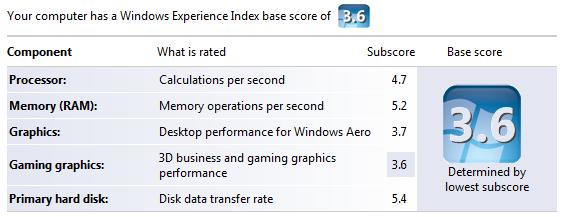
It seems that my 2.8GHz Dual Core Pentium with 2GB of RAM is enjoying a Windows Experience Index of 3.6. I reckon that a decent graphics card should improve that score – something for 2007 I think.
score.jpg

The first thing I needed to sort out was the boot order. Prior to this Vista install, I had Windows XP SP2 installed. Also prior to this install, I had stuck a 250GB IDE drive in the machine and installed Vista there – hence I already had the Windows Vista “new” boot manager interface already installed (on the same drive as Windows XP). So I found myself reading the BCDEdit FAQ. Incidentally, I’ve since removed the IDE drive in favour of a 250GB Western Digital SATA-2 drive.

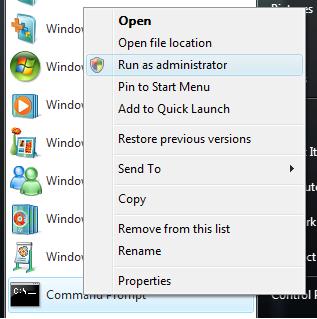
BCDEdit is a command-line tool, so you’ll need to be a little more careful with it that you would with a Windows application. You’ll also need to run BCDEdit using the Command Prompt and you’ll need to do this whilst running as an Administrator. To do this, just right-click on the Command Prompt icon and choose Run as administrator as shown below.
run_as.jpg

Simply running BCDEdit from the Command Prompt window reveals the three operating systems in the boot order:

[code]
C:\Windows\system32>BCDEDIT

Windows Boot Manager
——————–
identifier {bootmgr}
device partition=D:
description Windows Boot Manager
locale en-US
inherit {globalsettings}
default {current}
displayorder {ntldr}
{current}
{6c55cb61-8829-11db-bcb7-82d3be135651}
toolsdisplayorder {memdiag}
timeout 30

Windows Legacy OS Loader
————————
identifier {ntldr}
device partition=D:
path \ntldr
description Earlier Version of Windows

Windows Boot Loader
——————-
identifier {current}
device partition=C:
path \Windows\system32\winload.exe
description Microsoft Windows Vista
locale en-US
inherit {bootloadersettings}
osdevice partition=C:
systemroot \Windows
resumeobject {de2efb5f-97d0-11db-bdf0-b386e7cc6f53}
nx OptIn

Windows Boot Loader
——————-
identifier {6c55cb61-8829-11db-bcb7-82d3be135651}
device unknown
path \Windows\system32\winload.exe
description Microsoft Windows Vista
locale en-US
inherit {bootloadersettings}
osdevice unknown
systemroot \Windows
resumeobject {6c55cb62-8829-11db-bcb7-82d3be135651}
nx OptIn
[/code]

The entry for Windows Legacy OS Loader is for the existing Windows XP SP2 install, I need to keep that. The entry for Windows Boot Loader with the {current} identifier is the, perhaps obviously, the current Windows Vista install, i.e. the one I’m using – again, I need to keep that! I happen to know that the offending Windows Vista installation is the last one, so we’ll ask BCDEdit to remove it for us. Be sure to remember to include the trailing /f to force the deletion of the entry, as shown below:

[code]
C:\Windows\system32>BCDEDIT /delete {6c55cb62-8829-11db-bcb7-82d3be135651} /f
The operation completed successfully.
[/code]

The next thing I sorted out was the SoundBlaster Live 24 driver. As luck would have it, Creative released new Vista drivers today of all days! So I downloaded those and all was well.

However, I was a little surprised to see this:

not_recognised.jpg

I been using a Microsoft Fingerprint Keyboard for the last 12 months, it’s great; it has a very fluid feel about it. It has been on the market for at least a year, I would have thought that Vista drivers would have been part of the install or automatic update that takes place after the installation. Anyway, a little bit of hunting around the said drivers were found here.

That’s all for this post, I’ll write more as I move my line of business applications over to Windows Vista and to Microsoft Office 2007. Fortunately, all my data lives on another SATA drive, so there’s nothing to move there.

I’m just about to publish this post and I notice that a certain [non-Microsoft] vendor’s toolbar isn’t present, so I can’t spell-check this post without a little bit of cut’n’paste. Now, wouldn’t it be nice if I could just right-click the mouse on this Internet Explorer text box and have the recently installed Microsoft Word 2007 spell-check kick in for this blog post? Time for some more updates!

Technorati Tags: , , , , , , , ,

Lottery scams…

It’s good to see Colin writing about a lottery scam that reached his inbox. They are more common than folks think, it seems that the scammers think we’re more gullible at this time of year. Xmas is the worse time of year to play the UK lottery – more folks than normal buy a ticket so even with the huge odds against you, if you did win something, it’s likely that you’ll have to share it with more people 🙁 However, in for a penny, in for a pound: if you don’t take part, you can’t win. I’d settle for a tidy £50,000, thanks very much – tip jar is at the bottom of this post!

I’m waiting for Microsoft to formally announce the fact that they are in the lottery business, as the e-mail below seems to suggest 🙂

[Update: 14/01/2007: More information can be found here.]

Some of the “scam clues” have been marked in bold.

FROM THE DESK OF THE MICROSOFT
COORDINATOR {MICROSOFT GLOBAL E-MAIL LOTTERY}
INTERNATIONAL PRIZE AWARD DEPARTMENT
AMSTERDAM THE NETHERLANDS.
FILE REF:HL/5564/06/07/MICS
BATCH: MC11/834/5PDH /EU

OFFICIAL WINNING NOTIFICATION:

DEAR WINNER:

It is obvious that this notification will come to you as a suprise but please find time to read it carefully as we congratulate you over your success in the following official publication of results of the E-mail electronic online Sweepstakes organized by Microsoft,in conjunction with the foundation for the promotion of software products,(F.P.S.), held on the 9th of Dec.2006,in Amsterdam The Netherlands.

Wherein your electrononic email address emerged as one of the online
winning emails in the 1st category and therefore attracted a cash award of 1,000,000.00Euros(One Million Euros only).

Our winners are arranged into four categories with different winning prizes accordingly in each category.They are arranged in this format below:

CATEGORY NO.OF WINNERS WINNING PRIZES
1st. 2 1,000,000:00euros each
2nd. 8 800,000:00euros each
3rd. 13 470,000:00euros each
4th. 27 170,000:00euros each

We write to officially notify you of this award and to advise you to contact the processing office immediately upon receipt of this message for more information concerning the verification, processing and eventual payment of the above prize to you.

It is important to note that your award information was released with the following particulars attached to it.
(1) Award numbers: NL 56/7765
(2) Email ticket numbers: NL553/26/96
(3) Batch numbers: MC11/834/5PDH /EU
(4) The file reference numbers: HL/5564/40/07/MICS
{5} Serial Numbers:McST/006/NL4657

For verification purpose be sure to include:
(1) Your mailing address.
(2) Your Tel/Fax numbers.
(3) Your Nationality/Country.
{4}Your Full Names

To file for your claim,Please contact your Validating Officer for VALIDATION of your winning within Twenty-nine working days of this winning notification.Winnings that are not validated within Twenty-nine working days of winning notification are termed void and invalid. You are required to mention the above particulars
of your award in every correspondence to enable the Agent validate your winning.

CONTACT:
*******************************************************************
FOREIGN TRANSFER MANAGER
NAME MR.PATRICK DONKOR.
MICROSOFT SECURITY DEPARTMENT(NL).
TEL:+31-204-000-498.
TEL:+31-649-304-875.
FAX:+31-847-560-854.
E-mail: claimbglot@aim.com
********************************************************************

The Microsoft Internet E-mail lottery Awards is sponsored by our
CEO/Chairman, Bill Gates:http://www.templetons.com/brad/billmap.gif and a consortium of software promotion companies.The Intel Group, Toshiba, Dell Computers and other International Companies.The Microsoft internet E-mail draw is held periodically and is organized to encourage the use of the Internet and promote computer literacy worldwide.

Once again on behalf of all our staff,

CONGRATULATIONS!

Yours faithfully,

Rosemary Van Ken (Mrs)
MICROSOFT E-MAIL LOTTERY PROMOTION COORDINATOR.

Related Posts
Spam: Recognition
It’s a scam, it’s a hoax, but how do you know?


Technorati Tags: , , ,

Blog tag – my five things…

Daniel’s caught up in the blog tag thing, and now I’m it as they say.

So, five things you probably didn’t know about me:

  1. I’m desperate to write a book. I’ve spoken with a number of famous-name authors who tell me it’s a tough market and that I shouldn’t expect make my fortune in the writing world. That’s fine, I can accept that. If my message “gets out there”, that’s good enough for me.
  2. I never set out to exact revenge upon persons who hurt me in some way. If it happens naturally (i.e. I don’t have to do anything), humorously and without injury, that’s great.
  3. I am a procrastinator. To help become less of a procrastinator, I have set about a re-organisation involving David Allen’s Getting Things Done ideas. Part of the “solution” came about when started a clear out and have thrown out over 3000 3.5″ floppy discs, an HP 1220c printer and gave away an Acorn A440/1 with monitor and some 160MB (yes, MB) SCSI disk drives. All computer magazines over 12 months old were sent to the recyclers; all files and folders that had not been touched in 6 months were cleared down and put into the loft.
  4. I do not tolerate stupidity, or the people who promote it. Stupidity often manifests itself in the form of “policy over common sense”. I recall an incident that saw me arrive at Luton airport at 1345 for the 1600 flight back home. All the flight announcement monitors were displaying “delayed” or “cancelled” for the bulk of the flights. My 1600 flight was delayed until at least 2200. However, the lady on the easyJet desk told me that for £20, I could change my booking from the 1600 flight to the earlier 1400 flight…which was actually delayed, but would depart at 1600. So I paid the £20. My then employer pulled the policy over common sense card out of the bag and refused to reimburse the £20 – all because I had not used “their” booking procedure. That was an eye-opening experience for me. Common sense and practicality based on the current situation always beats policy’n’procedure. Needless to say, I argued my point and received the £20, albeit a month later than it should have been paid.
  5. I worry about how much innovation is lost because we work too hard. What are you doing that promotes innovation? I can’t remember the last time I listened to an album from start to finish…worse, I can’t remember the last time I listened to an album whilst doing nothing else…that’s when innovation comes into its own.

Who’s next? Colin, John, Simon, Rob and Zi.

Technorati Tags: , , , , , , , , ,

Craig Murphy: author, blogger, community evangelist, developer, speaker, runner