NxtGenUG – Fest07 – 23/05/2007

I am pleased to see that the chaps over at the NxtGenUG are having their first developer festival.

It’s early days, but the speaker line-up promises to be super (you should expect nothing less of the chaps at NxtGenUG!) The session abstracts are taking shape too!

Here’s what the chaps have to say:

The NxtGenUG boys are pleased to announce their very first One-Day Event. We’re not calling it a conference, as we want it to be more than that! We want it to be a day to remember, and another annual highlight for the UK Developer Community.

It’s called NxtGenUG Fest 07 and the initial details are at http://www.nxtgenug.net/fest07. The event will take place at Microsoft UK Headquarters at Thames Valley Park (TVP) on Wednesday 23rd May 2007 and starts at 0900. Food will be provided and we want everybody to go home with a decent amount of quality ‘swag’.

The day has a theme: “Into the future …”. We start the day looking at current technologies such as Vista, then we move into the ‘Orcas’ time-frame, then to 12 months hence or so, probably taking a look at dynamic languages and then really moving out into ‘who knows’ with a session from Microsoft Research. There will be a keynote, with an appearance from UK DPE manager Kevin McDaniel and words from the NxtGenUG crew and finally the day will finish with a new ‘Game Show’ style session courtesy of NxtGenUG featuring an awful lot of ‘swag’!

We’re absolutely chuffed to bits to announce that the ‘headline’ speaker is top TechEd speaker Rafal Lukawiecki and we will also be joined by Daniel Moth and Mike Taulty (perhaps) of the UK DPE and also by Lorna Brown from Microsoft Research. We have one more speaker to announce too, which we hope to do next week.

At lunchtime there will be ‘Grok’ talks presented by NxtGenUG members, on a variety of subjects to be announced.

This event is FREE to all fully paid-up NxtGenUG members and a mere £54.99 for non-members until 1 March 2007, check out the URL for more details. Numbers are strictly limited (we know … everybody says that … but we really mean it this time – 230 tops!) so register early is our advice!

Technorati Tags: , , , , , , , ,

Scottish Developers – Web Security Conference Day for Windows Developers – 12/04/2007

Scottish Developers are pleased to announce a full-day security-oriented event to be held in Edinburgh on the 12th of April 2007

You’ve taken the courses, you’ve scoured the Internet, you’ve attended many presentations, but alas, you still have many unanswered questions about website security.

Scottish Developers have secured the support of two consultants from Charteris plc, a respected IT and Managemant Consultancy and Microsoft Gold Partner. Barry Dorrans and Chris Seary are security specialists who regularly speak on subjects relating to the securing of web applications.

Come along on the 12th April for a full day of presentations and demonstrations surrounding the real world implications of the most common .NET web techologies: learn about the best practices, issues, gotchas, etc.

Bring along your questions and problems to gain assistance in finding solutions.

AGENDA
08:45 Registration
09:00 Hacking websites for fun and profit
10:30 Break
11:00 Securing applications and communications in ASP.NET
12:30 Lunch
13:30 Code Access Security – in-depth explanation and design pattern for web applications
15:00 Break
15:15 Securing Web Services with WS-*
16:45 Break
17:00 Managing Identity using Windows Cardspace
18:30 Close

– These are rough timings. Some session may end earlier or run later. We aim to shape the day around people’s need, not a time schedule!

Hacking websites for fun and profit
Presented by Barry Dorrans

How safe are your web sites?
Do you know what cross site scripting is?
SQL injection attacks?
Search engine leaks?

Learn how to check your sites for nasties by seeing how it’s done against badly written code and what you can do to secure your sites.

Securing applications and communications in ASP.NET
Presented by Barry Dorrans

This session aims to provide you with recipes to secure your asp.net application architecture, be they internet, extranet or intranet exposed. Covering authentication and authorisation strategies, identity management, securing communications, secrets, viewstate and more the session will discuss common best practices for secure architecture of ASP.NET applications.

Code Access Security – in-depth explanation and design pattern for web applications
Presented by Chris Seary

Chris has implemented CAS in several secure enterprise scale web applications. This talk will explain how CAS works, and also give details of a design pattern for implementing CAS in web applications.

We start by showing a web site being hacked, and then alter the application to stop the hacker while preserving the full functionality of the web site. We also look at OneClick and how it uses Partial Trust.

Securing Web Services with WS-*
Presented by Chris Seary

Why use WS-Security – surely IPSEc and SSL will secure our site?
Actually, WS-* specifications provide functionality that network protocols do not.

We look at what WS-Security can add to web service security, and go through a good deal of sample code (which will be available to download).

This presentation covers both WSE and WCF. We also look into WS-Federation, and how it is to authenticate users from different domains.

Managing Identity using Windows Cardspace
Presented by Barry Dorrans

Windows CardSpace is a framework developed by Microsoft which securely stores digital identities of a person, and provides a unified interface for choosing the identity for a particular transaction, such as logging in to a website.

This talk will cover the identity metasystem, how CardSpace works and how you can use within it ASP.NET.

BIOGRAPHIES
Barry Dorrans has spent 15 years cutting code, starting with mainframes, through DOS, Visual C and MFC before finally ending up on the .NET platform. His experience has ranged from banking systems to Europe’s largest streaming network. He now mentors developers through .NET migrations and Expert Witness services with Charteris plc (http://www.charteris.com).

Chris Seary has been awarded the Most Valued Professional (MVP) award by Microsoft for his contributions to the field of application security. He has been securing large scale applications for several years, including the Australian Taxation Office’s mid-range systems, which make up the world’s largest .Net application. He regularly speaks on security, and has had articles published in journals and on MSDN.

DATE
Thursday 12th April 2007, 9:00am – 6:30pm.

Registration begins at 8:45am.

VENUE
Microsoft Edinburgh,
127 George Street,
Edinburgh
EH2 4JN

LUNCH
Approximately one hour will be set for lunch and a place can be pre-booked at a local restaurant.

Please let us know if you have any special dietary requirements.

Lunch is NOT included in the price for this event.

REGISTRATION
Please send an email to john@scottishdevelopers.com indicating you’d like to register. We’ll then complete the registration and book you a place.

Technorati Tags: , , , , , , , , , , , , , , ,

BarCamp Scotland

barcampscotland.gif

I’m pleased to see that the BarCamp initiative has reached Scotland!

BarCamp is an ad-hoc gathering born from the desire for people to share and learn in an open environment. It is an intense event with discussions, demos, and interaction from attendees.

Saturday 3 March 2007, 2pm-6pm (flexible), APPLETON TOWER – Concourse, School of Informatics, University of Edinburgh

Further information can be found here:
http://barcamp.org/BarCampScotland

Technorati Tags: , ,

Yes, I know…

I’ve just upgraded to WordPress 2.1. Looking over to the right, you might see this:

WordPress database error: [You have an error in your SQL syntax; check the manual that corresponds to your MySQL server version for the right syntax to use near ” at line 1]
SELECT cat_id, cat_name FROM

I’m working on it, please hold off sending a barrage of e-mails!

Update: it’s an issue with the theme, sidebar.php to be more exact. A fix hack will be forthcoming

Technorati Tags: ,

DDD5 – DeveloperDeveloperDeveloper 5 – The Date

We are pleased to announce the date for the next DeveloperDeveloperDeveloper! event.

The planned date is: 30th of June 2007

More details to follow, but if you’d like to speak at DDD5, now is the time to start thinking about your session(s) and/or GrokTalks – we’re hoping to open the Call For Speakers on the 24th of March.

Watch this feed (other feeds are available!) for more important date announcements!

Technorati Tags: , , ,

Outlook – sharing individual folders between users

Today, a user asked me how they could share a folder between themselves and one or more other users within the same office.

Whilst the solution is “obvious”, right click on the folder in question and choose the Sharing menu option followed by the Pemissions tab, in reality, it’s not quite that easy.

Without going into song and dance about the solution, the key thing to note is that the person sharing the folder must give the recipients access to the entire folder hierarchy. The whole process is described graphically here.

Technorati Tags: , , , ,

Digital Forensics with EnCase

I attended a BCS event in Dundee last night. The speaker was Guidance Software‘s Russell May, he was discussing and demonstrating EnCase. Russell’s presentation style was very good, a few slides and plenty of demonstrations.

EnCase is a rather powerful tool that provides access to the file systems of Windows, Linux, AIX, OS X, Solaris – or to be more precise: FAT12/16/32, NTFS, EXT2/3 (Linux), Reiser (Linux), UFS (Sun Solaris), AIX Journaling File System (JFS and jfs) LVM8, FFS (OpenBSD, NetBSD and FreeBSD), Palm, HFS, HFS+ (Macintosh), CDFS, ISO 9660, UDF, DVD, ad TiVo® 1, TiVo 2, VMware, Microsoft Virtual PC, DD and SafeBack v2 image formats. All this from a single unified interface. It’s a product that is intended to work with “ïmages” rather than live hard drives, which makes perfect sense from an evidence preservation perspective.

Speaking of evidence preservation, Russell showed us a handful of photographs from real live “busts”. He stressed the importance of photographing “the scene”, particularly if you are seizing computer equipment that will be used as evidence. The photographs allow you to recreate the scene very quickly, wiring and all. Also worth photographing is the inside of the computer. Folks tend to hide all sorts of interesting stuff inside their PC’s base unit…Russell has found secondary unconnected hard drives, money and drugs!

Russell brought along a handful of Word documents that contained some text and images. There were documents that looked fairly normal to the untrained eye, i.e. some regular text and some benign images. However, looking at the file size, it is perhaps obvious that we were not being shown the big picture [sic]. Indeed, one of the documents had one large image sitting on top of 4 slightly smaller images. Another document appeared to contain nothing more than a short paragraph of text – in reality, an embedded Picture Object had its width and height set to 0…all we could see were the overlapping grab handles (which looked remarkably like a full-stop!)

Further examples saw Russell restore deleted partitions, identify numerous files with the incorrect extension (e.g. .VXD instead of .JPG), discover DOS batch files (.BAT) that convert between file extensions. We were even able to see how EnCase dealt with Alternate Data Streams (ADS). One thing that we didn’t see was how EnCase handled encrypted drives (using, for example, Private Disk, BitLocker, etc.)

I was pleased to see Russell push home the fact that the Format command doesn’t actually wipe out anything. The Format command actually performs a number of reads (typically three) and a verify. Any sectors that fail this read-verify test are marked as bad sectors and are thus ignored. In a nutshell, using FDisk and/or Format isn’t enough to stop a tool like EnCase or even a disk sector editor (such as this one by Acronis).

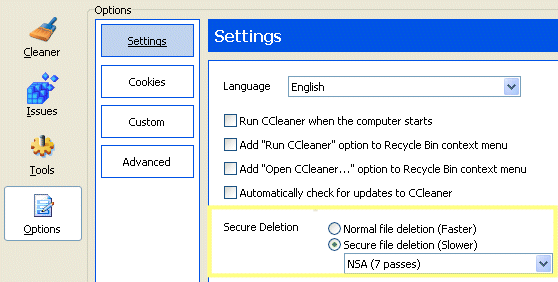
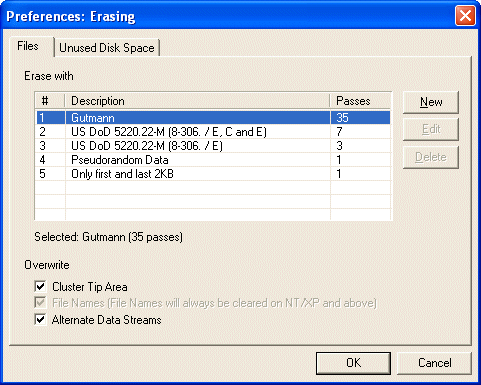
My key “take away” was the fact that EnCase and all other software-based forensic tools struggle with files that have been securely deleted using such tools as Eraser, SDelete or CCleaner. These tools offer a variety of secure delete options, including 1-pass, 3-pass US DoD 5220.22-M (8-306/E), 7-pass US DoD 5220.22-M (8-306/E, C and E) and 35-pass (Gutmann). The importance of this fact cannot be under-estimated – if you plan to dispose of your PC, it’s important to clear it out such that the next owner cannot recover your personal data, The BBC reports tales of woe from folks who didn’t clear out their hard drives here, here and here.

Personally, I use Eraser and CCleaner – both have a clean Windows user interface, Eraser even integrates with the Shell so that it appears when you right-click on a file or folder. If you are using CCleaner, the secure deletion options are secreted away here:

ccleaner.gif

…and if you’re using Eraser, the Edit -> Preferences -> Erasing (Control-E) menu option leads to this screen:

eraser.gif

Related Links
EnCase (and here)
Secure File Deletion – Eraser, SDelete, CCleaner
Alternate Data Streams
Gutmann’s algorithm – Secure Deletion of Data from Magnetic and Solid-State Memory (here also)
Encrypted Disks – Private Disk, BitLocker

If you found this information useful, please consider donating via PayPal!


Technorati Tags: , , , , , , , , , , , , , ,

Confidence Tricks

This seems to have been a weekend for computer support. Today, Sunday, I found myself looking at an eMachines PC that refused to connect to the Internet using the https protocol. The machine’s owner had already mentioned that he had ditched Norton Antivirus (and gone through a lot of pain trying to uninstall it) and had chosen WinAntiVirus as a replacement. Why? Well, a moderately reputable web-site “popped” something up that told him his computer needed “fixing”, a fake “you are infected” type of message. WinFixer and WinAntiVirus would “fix it” for a small fee. To all extents and purposes, it sounds fairly legit, you pay your money, you get a download link for a couple of products, you believe that you’re protected. Except, these two products do little more than invite their friends (ad-ware, spyware, malware, etc.) in to play about on your computer. From there, it goes from bad to worse. And it’s not new as this post confirms.

Luckily, I was able to uninstall WinFixer and WinAntiVirus, disable a whole raft of browser hijacks and clear down 115 items of ad-ware, spyware and malware. Whilst I was there, I killed off all the remaining Norton services and lingering processes. After a reboot and a re-scan, I was pleased to see the Windows XP shield appear at the bottom right – a clear sign that prior to my arrival something was “blocking” it thus preventing Automatic Updates from taking place. WinFixer and WinAntiVirus may not have themselves been blocking Automatic Updates and other security-related activities (such as blocking scanning software), but they were certainly responsible for something getting on the computer that did.

FWIW, the tools that I used to help me are: Crap Cleaner, Spybot and HijackThis.

On the premise that this is one of those “how do you know” scenarios, a piece of advice that I can offer is this:

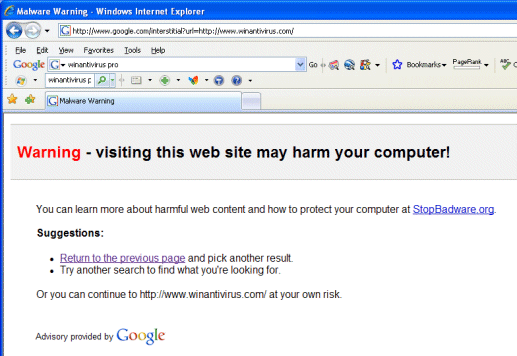
If a pop-up window (or an advert within a web page) tells you that your PC is infected and offers a “clean up” solution, either ignore it or at least put it into your favourite search engine. Google, for example, provides this advisory:

google.gif

Related links:
http://en.wikipedia.org/wiki/WinFixer
http://www.spywareguide.com/spydet_2731_winantivirus.html
http://stopbadware.org

Technorati Tags: , , , , , , , , ,

IE7 Connecting…

One of my wife’s friends popped in yesterday. Seems her laptop just “went and installed IE7”. After the installation was complete, when trying to visit a web-site, IE7 would just sit there attempting to connect, displaying “Connecting…” in the solitary tab. It also consumed huge amounts of CPU time giving the impression that the machine was slow.

I know John has been lamenting about this sort of issue over here and here. And Dan was kind enough to offer his good advice elsewhere in this blog. So add-ons seemed to be the logical place to start. However, even setting the Tools -> Internet Options -> Home Page to about:blank, it’s difficult to get to the Add-ons menu in order to actually do anything with them. Of course, being the sly individual that I am, I used HijackThis to rummage around myself.

I was pleased to read this Microsoft posting that highlights a menu option that most users may not have discovered:

ie7addons.gif

[scroll down and look for Toolbars that are incompatible with Internet Explorer 7]

This menu option will at least prove that your IE7 installation is working as it should. Sadly IE7’s Tools->Manage Add-ons menu item is greyed out, so you can’t simply go in and turn all the Add-ons off from here. However, you can choose Tools->Internet Options and then click on the Programs tab thus revealing the Manage Add-ons button, as the screenshots here confirm.

Armed with the knowledge that IE7 was working fine, I could now set about looking for the offending Add-on. Without beating about the bush, it turns out that it was the Norton Internet Security Add-on that was causing all the problems: disabling it forced NIS to go in search of a fix for itself, which, to my amazement, it found. It would appear that I am not alone, others are having similar problems as this post suggests.

Anyway, my wife’s friend now has a working laptop, with IE7 and NIS running happily, so all is well. YMMV

Technorati Tags: , , , , ,

Vista Developer Launch – webcast – live now!

If you couldn’t make it to Reading for the launch itself, it is being streamed live here:

http://gaia.world-television.com/ms/20070119/

More information here:

http://www.microsoft.com/uk/launch2007/dev/default.mspx

Line up for today, day 1, track 1:

1045 – 1200 Extending the Microsoft Office User Interface – Mike Taulty
1245 – 1345 Microsoft Office and XML – Making the Data Work for You – Mark Johnston
1400 – 1500 Beyond Office: Extending Your Reach with Office Server – Mike Ormond
1515 – 1615 Microsoft Office SharePoint Server – Business Intelligence and Content Management Solutions – Martin Parry
1630 – 1730 Microsoft Office SharePoint Server – New Collaboration Features and Workflow – Daniel Moth

Track 2:

1045 – 1200 Clarity – Presentation Advances in the .NET Framework Version 3.0 – Mark Johnston
1245 – 1345 Clarity – Presentation Advances in Windows Vista – Daniel Moth
1400 – 1500 Confidence – Security and Reliability with Windows Vista – Martin Parry
1515 – 1615 Connectivity – Windows Vista for Syndication and Workflow – Mike Ormond
1630 – 1730 Connectivity – Distributed Applications on Windows Vista – Mike Taulty

On-demand downloadable versions of the sessions can be found here.

Technorati Tags: , , , ,

Craig Murphy: author, blogger, community evangelist, developer, speaker, runner