Category Archives: General

WordPress Widgets and Google Adsense

I’ve upgraded my blog to use widgets and in the process upgraded a few other things to use widgets too.

I’m using Otto’s Google Adsense widget, it’s working very well.

Except, as you may recall reading here and here, there is an issue relating to the WordPress post preview and Google Adsense that could result in Google blocking your Adsense account.

I’ve not checked to see if the problem has “gone away”, but to be on the safe side, I’ve hacked Otto’s gadsense.php widget to prevent Google Adsense blocks from appearing in the preview. Here’s the code fragment that includes the hack, lines 10 and 12 are the ones to look out for:

[code lang=”php”]
function widget_adsense($args, $number = 1) {
extract($args);
$options = get_option(‘widget_adsense’);
$title = $options[$number][‘title’];
$text = $options[$number][‘text’];
?>

is_preview): ?>


Technorati Tags: , , ,

Grr – Internet Explorer 7 crashes, twice in 24 hours…

Grumble.

Yesterday morning I lost a fairly carefully prepared collection of web-sites that I was visiting using tabbed-browsing. I chose to right-click and open a URL in a new window…boom, IE disappears completely. Now, this morning, it did the same…except I had a page full of text in a fresh blog posting…gone. I’m too tired to recreate it now, but will do so later on today – you’re not missing much, just me muttering on about a blog re-vamp and how cool WordPress widgets are.

Windows XP Version 5.1.2600 Service Pack 2 Build 2600
Internet Explorer Version 7.0.5730.11

Note-to-self: press ‘save and continue editing’ quickly and more frequently (at least until the move to Vista is complete).

Technorati Tags:

Windows Vista – first impressions…

So that’s Windows Vista Ultimate installed, I’m dual-booting alongside my existing Windows XP SP2 installation. This install started at 2225 and ran on until 2248 when the second re-boot had taken place. A little bit of configuration and some automatic updates, and at 2255 I was ready to go – an end-to-end installation time of 30 minutes.

It seems that my 2.8GHz Dual Core Pentium with 2GB of RAM is enjoying a Windows Experience Index of 3.6. I reckon that a decent graphics card should improve that score – something for 2007 I think.
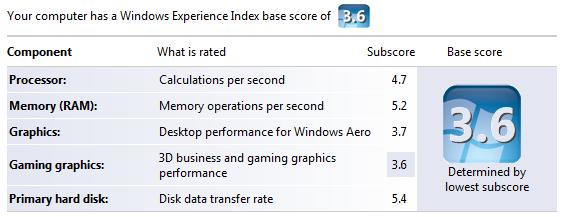
score.jpg

The first thing I needed to sort out was the boot order. Prior to this Vista install, I had Windows XP SP2 installed. Also prior to this install, I had stuck a 250GB IDE drive in the machine and installed Vista there – hence I already had the Windows Vista “new” boot manager interface already installed (on the same drive as Windows XP). So I found myself reading the BCDEdit FAQ. Incidentally, I’ve since removed the IDE drive in favour of a 250GB Western Digital SATA-2 drive.

BCDEdit is a command-line tool, so you’ll need to be a little more careful with it that you would with a Windows application. You’ll also need to run BCDEdit using the Command Prompt and you’ll need to do this whilst running as an Administrator. To do this, just right-click on the Command Prompt icon and choose Run as administrator as shown below.
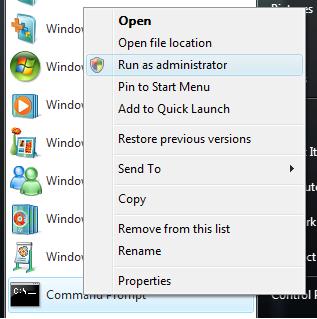
run_as.jpg

Simply running BCDEdit from the Command Prompt window reveals the three operating systems in the boot order:

[code]
C:\Windows\system32>BCDEDIT

Windows Boot Manager
——————–
identifier {bootmgr}
device partition=D:
description Windows Boot Manager
locale en-US
inherit {globalsettings}
default {current}
displayorder {ntldr}
{current}
{6c55cb61-8829-11db-bcb7-82d3be135651}
toolsdisplayorder {memdiag}
timeout 30

Windows Legacy OS Loader
————————
identifier {ntldr}
device partition=D:
path \ntldr
description Earlier Version of Windows

Windows Boot Loader
——————-
identifier {current}
device partition=C:
path \Windows\system32\winload.exe
description Microsoft Windows Vista
locale en-US
inherit {bootloadersettings}
osdevice partition=C:
systemroot \Windows
resumeobject {de2efb5f-97d0-11db-bdf0-b386e7cc6f53}
nx OptIn

Windows Boot Loader
——————-
identifier {6c55cb61-8829-11db-bcb7-82d3be135651}
device unknown
path \Windows\system32\winload.exe
description Microsoft Windows Vista
locale en-US
inherit {bootloadersettings}
osdevice unknown
systemroot \Windows
resumeobject {6c55cb62-8829-11db-bcb7-82d3be135651}
nx OptIn
[/code]

The entry for Windows Legacy OS Loader is for the existing Windows XP SP2 install, I need to keep that. The entry for Windows Boot Loader with the {current} identifier is the, perhaps obviously, the current Windows Vista install, i.e. the one I’m using – again, I need to keep that! I happen to know that the offending Windows Vista installation is the last one, so we’ll ask BCDEdit to remove it for us. Be sure to remember to include the trailing /f to force the deletion of the entry, as shown below:

[code]
C:\Windows\system32>BCDEDIT /delete {6c55cb62-8829-11db-bcb7-82d3be135651} /f
The operation completed successfully.
[/code]

The next thing I sorted out was the SoundBlaster Live 24 driver. As luck would have it, Creative released new Vista drivers today of all days! So I downloaded those and all was well.

However, I was a little surprised to see this:

not_recognised.jpg

I been using a Microsoft Fingerprint Keyboard for the last 12 months, it’s great; it has a very fluid feel about it. It has been on the market for at least a year, I would have thought that Vista drivers would have been part of the install or automatic update that takes place after the installation. Anyway, a little bit of hunting around the said drivers were found here.

That’s all for this post, I’ll write more as I move my line of business applications over to Windows Vista and to Microsoft Office 2007. Fortunately, all my data lives on another SATA drive, so there’s nothing to move there.

I’m just about to publish this post and I notice that a certain [non-Microsoft] vendor’s toolbar isn’t present, so I can’t spell-check this post without a little bit of cut’n’paste. Now, wouldn’t it be nice if I could just right-click the mouse on this Internet Explorer text box and have the recently installed Microsoft Word 2007 spell-check kick in for this blog post? Time for some more updates!

Technorati Tags: , , , , , , , ,

Blog tag – my five things…

Daniel’s caught up in the blog tag thing, and now I’m it as they say.

So, five things you probably didn’t know about me:

  1. I’m desperate to write a book. I’ve spoken with a number of famous-name authors who tell me it’s a tough market and that I shouldn’t expect make my fortune in the writing world. That’s fine, I can accept that. If my message “gets out there”, that’s good enough for me.
  2. I never set out to exact revenge upon persons who hurt me in some way. If it happens naturally (i.e. I don’t have to do anything), humorously and without injury, that’s great.
  3. I am a procrastinator. To help become less of a procrastinator, I have set about a re-organisation involving David Allen’s Getting Things Done ideas. Part of the “solution” came about when started a clear out and have thrown out over 3000 3.5″ floppy discs, an HP 1220c printer and gave away an Acorn A440/1 with monitor and some 160MB (yes, MB) SCSI disk drives. All computer magazines over 12 months old were sent to the recyclers; all files and folders that had not been touched in 6 months were cleared down and put into the loft.
  4. I do not tolerate stupidity, or the people who promote it. Stupidity often manifests itself in the form of “policy over common sense”. I recall an incident that saw me arrive at Luton airport at 1345 for the 1600 flight back home. All the flight announcement monitors were displaying “delayed” or “cancelled” for the bulk of the flights. My 1600 flight was delayed until at least 2200. However, the lady on the easyJet desk told me that for £20, I could change my booking from the 1600 flight to the earlier 1400 flight…which was actually delayed, but would depart at 1600. So I paid the £20. My then employer pulled the policy over common sense card out of the bag and refused to reimburse the £20 – all because I had not used “their” booking procedure. That was an eye-opening experience for me. Common sense and practicality based on the current situation always beats policy’n’procedure. Needless to say, I argued my point and received the £20, albeit a month later than it should have been paid.
  5. I worry about how much innovation is lost because we work too hard. What are you doing that promotes innovation? I can’t remember the last time I listened to an album from start to finish…worse, I can’t remember the last time I listened to an album whilst doing nothing else…that’s when innovation comes into its own.

Who’s next? Colin, John, Simon, Rob and Zi.

Technorati Tags: , , , , , , , , ,

Forth Road Bridge – Podcast #2

My return trip north over the Forth Road Bridge, for Monday.

FRB Podcast #2 [2MB] – the one with the 4×4 driver. Monday 11/12/2006, Edinburgh to Fife, depart 1735, arrive 1826.

This one runs a little fast, you can hear the clicks between edit points. I edited a lot of content out, this one is just 10 minutes long.

Technorati Tags: , , , , , , ,

Forth Road Bridge – Podcast #1

I don’t know what compelled me to do this, but after The Scotman’s campaign for a second crossing (be it a bridge, a tunnel or something else) over the River Forth Firth Of Forth [thanks Colin!], I’ve decided to record my experiences crossing the Forth Road Bridge.

I’ve chosen to podcast my entire journey, edited down such that the 75 minute drive is a 30 minute podcast. I’ll cover the route south, i.e. from Fife over to Edinburgh and back again.

Over the course of a week, you’ll hear a lot of my views and opinions on what’s wrong with the commute over to Edinburgh. Editing the podcasts takes about an hour, so please be patient, I will get them all uploaded as soon as possible. Also, the sound quality isn’t production quality, but it’s clear enough to get the point across.

I’ve got a lot that I want to say about this journey, I’ll try and put together a blog post “real soon now”.

FRB Podcast #1 [6MB], Monday 11/12/2006, Fife to Edinburgh, depart 0745, arrive 0900. Notice the slight frustration build up towards the end of the podcast!

Technorati Tags: , , , , , ,

GTD podcasts, giving up TV, early rising…

This weekend was fairly productive. Well, productive with the exception of the time spent mashing up various bits of hardware in a failed attempt to install Vista on a test machine – it seems that Promise don’t ship Ultra100 drivers for my aging motherboard! So it looks like it’s time for a newer test machine (All donations will be gratefully received, there’s a PayPal link at the bottom of this post!) I bought my primary desktop via the Dell Outlet, might be time to look there again!

Anyway, here are a few things that I found interesting this weekend:

Getting Things Done – podcasts
David Allen, of Getting Things Done fame, is podcasting. Actually he has teamed up with Merlin Mann of 43 Folders fame. The shows so far are:

Productive Talk on Implementing GTD
Productive Talk on Interruptions
Productive Talk on Email
Productive Talk on Teams
Productive Talk on Someday Maybe
Productive Talk on Patching Leaks
Productive Talk on Procrastination

There’s an MP3 download available, so it’s possible to transfer them to your generic MP3 player and listen to them whilst commuting.

Giving Things Up
I discovered Steve Pavlina’s blog whilst I was looking at Outlook productivity tools (more about this in a moment or two). Steve has a lot of interesting content on his blog. Posts that caught my eye were related to giving things up: giving up coffee and giving up TV. Prior to completely giving up TV, it’s probably worth trying to reduce the amount of TV that is watched first.

Kind of related to giving things up (long lies), I also found his thoughts on how to become an early riser worthwhile reading. It’s a two-parter, the second part can be found here.

Tied in with getting up early, Steve has some tips on how to get when then alarm goes off – how to avoid the “another 10 minutes” procrastination problems!

Elsewhere, I found some good stuff over at Dave Cheong’s blog. Most notably, waking up early and consistently and 18 ways to stay focused at work. Two excellent posts, I wish I could have an office/study as tidy as Dave’s – it takes time and effort, may be I’ll get there.

Personal Development Ideas
This weekend also saw me discover the work of Gleb Reys – the PDI blog. I found this site whilst reading reviews of My Life Organised. Life just seems to be somewhat hectic, I’m spending a lot of time just trying to stay afloat, may be I have to do too much? Anyway, I’ve been looking at software tools that can help me with Microsoft Outlook, David Allen’s GTD work and the 43 Folders filing system. So far I’ve been looking at such tools as ClearContext (as inspired by Omar), Speedfiler (as endorsed by Omar and Scott). I’ve installed both Speedfiler and ClearContext to see if they’ll help me manage (and dispose of) the thousands of e-mails that I’ve got spread over three PST files.

If anybody knows of a good place to buy a good set of the files that make up 43 Folders, please let me know as I’m struggling to find anything that is close to suitable.


Technorati Tags: , , , , ,

How much is a 1GB USB drive at Amazon?

When I checked my Amazon basket this evening, I nearly fell off my chair when I saw this:

amazon1.gif

It’s nearly Christmas, please excuse what you see in my basket!

I guess they just want it cleared out of baskets as they are probably gearing up to removing it from their listings.