“Stop Doing” Lists

I attended a two-day induction course last week. Whilst there were many useful “takeaways”, good ideas, common sense approaches, etc. the course leader presented us with a book: Good to Great by Jim Collins.

Naturally I skimmed through the table of contents, then skimmed through each chapter. One thing that I picked up from this brief read was the need for “Stop Doing” lists. These are the opposite of “To do” lists.

Since I am a great believer in lists, particularly To Do lists, I figured that Stop Doing lists deserve more of my time. We all spend a lot of time either floundering or procrastinating – we prioritise tasks based on their level of enjoyment (best tasks first), their ease of completion (low value tasks, completed before high value tasks that require longer to complete), etc.

In amongst all of the tasks that we “do”, there are activities that are of high importance (perhaps high value), those that are middle of the road and those that are of low importance (low value).

Q. How much time and effort are you putting in to service those low importance tasks? Probably more than you would like. And how much value are they bringing you?
A. Probably not enough.

Q. Are those low importance tasks impacting the service you provide to the other higher importance tasks?
A. It’s very likely that it is.

Q. If you stopped doing the low importance tasks, would the service you could deliver to the high importance tasks improve?
A. A resounding yes.

Earlier in this post, I mentioned floundering. It’s perhaps a little strong, what I mean by its use is to fumble or bumble about whilst endeavouring to complete a task. Personally, I notice that I flounder whilst trying to get out of the house in the morning (to go to work). Floundering manifests itself in many ways, in my case, I find myself making second and third trips back up the stairs – when I had previously thought that I my tasks/work upstairs was complete. It’s a petty example, but such floundering has major knock-on effects, the extra trip upstairs can mean missing a particular train, which in turn delays getting to the office by 15 minutes…

The same effect can be noticed during day-to-day project work. I’m sure that we’re all guilty of revisiting what we thought were completed tasks…or perhaps losing the focus slightly then engaging in either re-work or dilly-dallying to get things going again. I know that I find myself doing this, sometimes, I can’t be alone…and given the number of books that have been written about getting things done, I’m pretty sure that it’s not just me!

How can I identify the “stop doing” items?
I’ve seen people use the “red dot” technique, whereby they tag each work item or task with a red dot each and every time they touch it. Obviously the more often an item is touched, the more it looks like it has measles. However, whilst that method will identify some items, it won’t help you identify the low priority, low importance items, for it is these that you should be homing in on and weeding out. Everybody has a different definition of low priority, low importance, for me I’m trying to do fewer activities that impede my progress on higher value projects/items. This involves me being ruthless with any task that I believe is a time-waster, if there’s no value in it for me, it going on to the Stop Doing list.

In a nutshell, Stop Doing lists revolve around doing less of what adds little value (or little profit) to your activities whether business or personal. Instead, we should focus on doing more of those items that add more value (or more profit). By virtue of doing less (or no) low value items, we are free to spend more time concentrating on the higher value items. Those activities that we do spend time on will have more time spent on them, thus as a job, it should be done that bit better.

Food for thought…

Good To Great is also available as an audio CD.

PC security is not the first thing on the mind of a home user

The MD of Roundtrip Solutions Limited posted an interesting link to a piece about security in this posting: 81% of Home Users Lack Critical Security Elements (which links to this CNET article).

Security is something most folks generally ignore. I took delivery of my next door neighbour’s Dell PC this week (late December 2005), now I know security won’t be on his mind once it’s all set up and working. And since virtually all Dell’s are supplied with a Symantec anti-virus/firewall product that’s free to use for the first three months, any Internet nasties that were thinking of taking up residence on his machine will be kept away…for the first three months. After that, and after the Symantec product has asked for a credit card number and been told “no” (politely of course), the machine gradually opens up and the nasties come in. That’s the start of spyware, malware, viruses, rootkits and trojans, each inviting the other, each breeding and infecting the machine, applications, e-mails and ultimately, machines belonging to others…the zombie network takes over.

[April 2006 update: Dell are now shipping with McAfee as their anti-virus vendor of choice, and they are offering 15 months instead of 3, but do check as I believe that this is an offer not a permanent thing]

A further three months might pass before the “fastest machine money could buy” starts taking a long time to boot up…simple operations take forever…perhaps the odd “memory could not be read” error or even a blue screens of death. If they’re lazy, they might put up with it for another few months, but invariably “Friendly Bloke/Relative (FB/R) who works in IT” gets a call.

The majority of spyware “items” infect your PC largely because you clicked on something that essentially gave them permission. It’s rather like a burglar knocking at your door, you invite him or her in, they take some stuff, including a copy of the keys and go. OK, so the spyware doesn’t actually go, it lurks about on your PC making it slower and slower. And spyware will not take a copy of your keys, it might take a copy of your passwords, credit card numbers etc. You may have read a lot in the press about identity theft – well, spyware is responsible for some of the pain and turmoil caused by identity theft. Spyware, malware, etc. that sits on your PC logging your keystrokes, watching what sites you visit, can be the first step to your identity being stolen…or worse, your bank account being accessed without your knowledge or consent.

Now, until the major banks implement better security mechanisms, on-line banking is threatened by these key loggers. However, if you PC is protected using the tools mentioned in this posting, you can relax a little. You can relax even more when you learn that the banks are working on methods that will make your usage of their services a little bit more secure. In addition to the plethora of passwords and bits of passwords that banks expect us to remember (never write down of course!), new techniques such as two-factor authentication are in the pipeline. It is the PassMark system that offers this two-factor authentication, more can be found here and here.

However, whilst your bank balance is somewhat hardened, imagine how your children might react if the computer that they had been using for their homework suddenly presented them with a rather less than salubrious list of previously visited sites? That’s what I’ve found a lot of PCs that I “look after” under the auspices of FB/R. Here’s a carefully edited screenshot that demonstrates the kind of thing to expect.
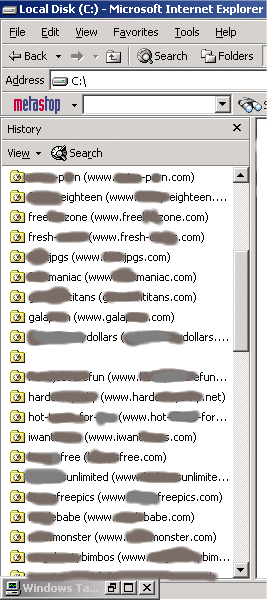
spyware

This is an extreme example. The machine in question had been used to view rather a lot of pornographic material and as such had been subject to a variety of popups many of which expected the user to click ok, Yes or Accept. It is this affirmation that lets the burglar into your house and thus free to do as they please. As soon as you confirm that you are happy to have something downloaded and installed on your PC, there’s often little that can be done to prevent any damage being done.

What’s worse, this particular machine had lost its Start bar, hence the appearance of the Windows Task Manager at the bottom of the screenshot. The user of this particular machine had to use the Task Manager to run applications (some of which were in fact corrupt). By visiting pornographic sites, downloading whatever they have to offer and claim to need in order to run, this computer become very slow, unstable and required a complete re-format to bring it back to life.

Incidentally, the metastop toolbar that you see in the screenshot above, it’s a “search hijacker”. Whilst it might not sound dangerous, largely because many search hijackers will return similar results to those returned by your preferred Internet search tool, e.g. MSN Search or Google. The subtle difference being the fact that you might be directed to a site that gives the search hijacker some benefit based on the number of clicks and click-thrus that are made. If you are offered the chance to install a toolbar, particularly if you are just browsing, my advice to you is to ignore it. There are very few toolbars that you need – the big names have the market sewn up, Microsoft, Google, Yahoo, etc. More about this particular search hijacker can be found here.

You can, however, protect yourself in a number of ways:

  1. User education – don’t visit dodgy sites. This is harder than it sounds – convincing folks not to visit dodgy sites is a mind game, good luck!
  2. Avoid clicking on popups. Use the default operating system close icon instead: in Windows this is a red cross in the top right of the popup – some popups will try and fool you by including their own red cross, watch out for this and don’t be tempted to click on it. If in any doubt, ignore the popup, reboot and don’t visit that site again!
  3. Purchase and install a reputable firewall product. Many popular broadband routers, such the NetGear DG834 and the DLink DI-624+, have a firewall built in. Generally, this is a good thing and it does give you out of the box protection. However, if you really want to know how and when your PC is sending messages from your machine to the Internet, a operating system level firewall is useful. There are many good ones, such as ZoneAlarm. Many antivirus products now have an integrated firewall, so it is worth considering software products that do both – there are a few listed in the Recommended Software section at the end of this posting.
  4. Purchase and install a reputable anti-virus product. Whilst you can rely on your ADSL/Broadband router to protect you with its firewall, there’s nothing it can do to help you protect your machine from viruses, Trojan horses and other nasties that might come in via other means.
  5. Install an anti-spyware product. There are some good free tools, such as Ad-Aware, however like firewalls, many anti-virus vendors are integrating them into their products. John notes that he is enjoying success with Windows Defender.
  6. Use a file cleaner such as CCleaner. Over time, your computer builds up a lot of temporary files. Whilst Windows is reasonably good at maintaining these files, inevitably many remain. Amongst many others, CCleaner is capable of removing a whole plethora of temporary and unneeded files. After you have used CCleaner, I recommend that you defragment your drives too.

What if I don’t want to buy any software?
In that case, I recommend that you download and install a firewall such as ZoneAlarm. I would also suggest installing a free anti-virus product, such as AVG or avast!. Further, you should also install Ad-Aware.

Of course, it’s not much use downloading and installing these products, whether free or not. You have to keep them up to date. Most of the products I’ve mentioned in this post offer some form of automated update, so once you’ve installed them, they’ll happily update themselves in the background – it’s worth watching to see that this does actually happen. The first sign of a virus infection usually manifests itself when the virus tries to disable or alter the anti-virus protection that you have installed. Viruses are not known for their delicacy and often step on lots of toes whilst attempting to thwart the anti-virus protection!

On-line alternatives
Many anti-virus vendors offer their “scans” on-line, often for free. Microsoft’s Windows Live Safety Center and Symantec do just that.

Lastly…
This post homes in on the need for security on your [home] PCs, the author makes reference to a number of products that can help achieve a level of security that is sufficient. However, security is an on-going thing, it’s important to keep any security products up to date. It’s also about vigilance: don’t do anything “out of the ordinary”, don’t click “yes” or provide some sort of confirmation to popups that you weren’t expecting. Don’t open e-mails or attachments if there is anything “odd” about them, particularly if they look as if they are “executable”, e.g. .exe or .com extension…or unsolicited Word/Excel documents. The author welcomes comments and pointers to other competent software.

Further Reading
Identity theft, phishing, key loggers…
http://www.rootkit.com/
Sony, Rootkits and Digital Rights Management Gone Too Far
EMPLOYEE FRAUD – THE ENEMY WITHIN
Banks introduce transfer delays in drive to stamp out phishing
Victims of internet bank fraud will have to pay up

Recommended Software
Windows Live OneCare

Norton Internet Security

ZoneAlarm Internet Security Suite 6

Kaspersky Antivirus

McAfee VirusScan Professional 6.0

Panda Antivirus Platinum

AVG 7.0 Anti Virus PRO

[Originally written 31st December 2005, not posted. Revised April 2006, posted]

Identity theft, phishing, key loggers…

Despite what you hear, major banks have a more serious problem to contend with than on-line fraud – there is a lot more fraud happening inside the banks themselves, i.e. internal fraud. In a recent case, somewhat close to home, the bank in question acted rather naively and demonstrated that they are not geared up to deal with on-line security issues. I can say this because earlier this year I had to verify that my friend’s business PCs were not infected with any viruses or key loggers – they had just witnessed a large sum of money vanish from their business account via a transaction that apparently used their own credentials.

However, instead of the transaction being carried out from a PC located in Scotland, the transaction was carried out using a computer located in Sheffield (insofar as we could tell, the actual machine could easily have been elsewhere in the world – this is the concept of a zombie PC coming to the public eye.) The computer in Sheffield appeared to be using a cable modem and Blueyonder as their Internet Service Provider (ISP). Now this, in my opinion, is the first warning sign and one that the bank should have picked up on before committing the transaction and allowing it to complete. The business in question use a fixed IP address, therefore it is always the same address each and every time they use the bank’s on-line service.

Suddenly, out of the blue, this customer wants to transfer over 95% of their business account to an account that they have never used in the past. Clue number two: what sort of business transfers 95% or more of their account in one go? Clue number three: the destination account is unknown. Clue four: over 95% of all this business’ transactions are conducted via Scottish branches of the destination bank.

Worse than that, a few days later, the same bank and the same software was used to conduct another withdrawal, this time from a ‘deposit’ account that should never have allowed withdrawals of this size anyway. This time the PC was located outside of Scotland and was using AOL as their ISP. At this point, the business in question lost faith in the bank’s ability – the business owners had been accused of performing the initial fraudulent transaction themselves, for it to then happen a second time on an account that was meant for deposits only, cracked an egg on the bank’s face.

Luckily, the business in question had all their money returned rather quickly, which provided a clue that the problem was more internal than external. It is not uncommon for disgruntled employees to leave a bank, “walk off” with a handful of user login information, go to ground, then use it a few months after their departure. Indeed there are a few links at the end of this posting that confirm this happens, they make worrying reading.

Of course, had the bank been using a two-factor authentication mechanism, this kind of fraud would be virtually impossible to commit.

Why am I so hard on the bank in question? Well, in 2004, my bank were wise enough to notice that I had used my credit card in Plymouth, Aberdeen and Edinburgh within a few days of each other – this didn’t worry them too much, it was reasonable to expect me to have been in those three locations in the space of three days. However, on the fourth day, I happened to use the same card in Tenerife, a fact that when put in context with the other three days travel caused the bank to give me a call. They did authorise the transaction in Tenerife, and gave me an option for them to call me back. Once they had confirmed that all was well with my credit card, business continued as usual.

I’ve not really touched on phishing, in this post. Perhaps because I don’t believe that this was a phishing case. All signs are that it was an internal security issue, not the work of a rogue e-mail asking the business owners to login to the bank via a link in the said e-mail. Of course if you do receive such an e-mail, remember that the major UK banks will never ask you for your login details to be “repeated” in their entirety and remember that it’s always best to manual type in your bank’s URL.

Further Reading
PC security is not the first thing on the mind of a home user
EMPLOYEE FRAUD – THE ENEMY WITHIN
Banks introduce transfer delays in drive to stamp out phishing
Victims of internet bank fraud will have to pay up

The Next Generation User Group

UserGroup

John Price, Dave McMahon and Richard Costall would like to announce the formation of a new User Group called The Next Generation User Group (known as NxtGenUG). The purpose of the User Group is to help its members discover and get excited about all the latest and new technologies coming out of Microsoft such as .NET 2.0, SQL Server 2005, WPF, WCF, WF, LINQ, Office 12 and .NET 3.0.

It doesn’t matter what development language is your language of choice, and we will also be covering techniques and technologies currently out there which people are using now. Our first meeting is on 8th May at the Coventry Flying Club. It’s going to be informative and fun, with great speakers from the community and Microsoft and competitions and prizes every month!

So make a note of the URL: http://www.nxtgenug.net Register with the site and come and join the fun. Membership rates are extremely competitive, and anyone who attended the VBUG launch extravaganza last November will know what to expect.

Check out some of the early content – including a rare interview with Soma Somasegar – Vice President of the developer division at Microsoft in Redmond and an excellent interview with Marcus Perryman – Mr Mobile Devices.

We are really excited about this and i hope you are to… its only version 1.0 of the site and we have SO MUCH MORE TO COME!

Fasten your seatbelts – NxtGenUG is clear for take-off!

Trivial: Binary To Integer

In response to a web-forum question, I found myself writing a little C# to convert from a string (containing a binary number) into the integer representation of the same. It’s the kind of trivial coding problem that first year programmers would come up against… Of course, we could make it harder by stipulating that we cannot use System.Convert.

I’m sure that there are much better ways of doing this, and I’d be glad to see some of them appear in the comments for this post. There, a kind of challenge…If the quality of the comments is good enough, I might be able to offer a small prize if you are a UK resident. No promises though!

[code lang=”C#”]
public int BinToInt(string binaryNumber)
{
int multiplier = 1;
int converted = 0;

for (int i = binaryNumber.Length – 1; i >= 0; i–)
{
int t = System.Convert.ToInt16(binaryNumber[i].ToString());
converted = converted + (t * multiplier);
multiplier = multiplier * 2;
}
return converted;
}
[/code]

In use:

[code lang=”C#”]
// remember SEFTU, sixteen, eight, four, two, one
listBox1.Items.Add(BinToInt(“00001”).ToString()); // 1
listBox1.Items.Add(BinToInt(“00010”).ToString()); // 2
listBox1.Items.Add(BinToInt(“00011”).ToString()); // 3
listBox1.Items.Add(BinToInt(“00100”).ToString()); // 4
listBox1.Items.Add(BinToInt(“00101”).ToString()); // 5
listBox1.Items.Add(BinToInt(“00111”).ToString()); // 7
listBox1.Items.Add(BinToInt(“01000”).ToString()); // 8
listBox1.Items.Add(BinToInt(“10000”).ToString()); // 16[/code]

It might be of use to somebody…somewhere…

DDD3 – Voting Closed

Last Friday saw us close the voting for DeveloperDeveloperDeveloper 3 sessions.

I’ve just made the first pass at the agenda and it looks like, based on the votes, that we’ll have 25 sessions this time around.

I can’t reveal the sessions just yet, but will post them here as soon as we finalise them…which will be within days rather than weeks.

Thanks to all who voted, you shaped the agenda, it was truly a community for the community operation!

Selectively removing checkboxes in a .NET 1.1 / 2.0 TreeView

Earlier this month, I had the need to customise a TreeView control such that it had checkboxes against some, not all, of the nodes.

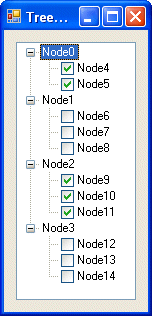
Here’s a screenshot of what I wanted:

Treeview

It requires a little bit of code to achieve this effect, but is was worth the effort. Here’s the code that performs the magic:

[code lang=”C#”]
using System.Runtime.InteropServices;

namespace Treeview___CheckBoxes
{
public partial class Form1 : Form
{
public Form1()
{
InitializeComponent();
}

private void Form1_Load(object sender, EventArgs e)
{
// Iterate over the root nodes, removing their checkboxes
for (int n = 0; nTechnorati Tags: , , ,

GSOH at The Code Project

It’s good to see that the folks over at The Code Project have a sense of humour! I came across the message below whilst browsing their site.

Oops!
Hear that crunching sound? Something just broke.

Why did this happen?
Because either we screwed up in a way that wasn’t immediately obvious until now, or because the ASP engine running this site has just rolled over and died, or because the site is simply having a bad hair day.

Options
Try and do whatever you did again. Try again.

Open the CodeProject home page, and then look for links to the information you want. Sure, the information you need is probably on this page, but you never know your luck in a big city.
Pray, curse, or sacrifice burnt offerings, then see 1.

The Error
The Page: : /vb/net/CustomDrawTreeview.asp
The Time: : Sunday, April 09, 2006, 1:19:58 PM
The Server: : Web09
The Error No. : 0x80004005. Remember this number. There will be a test.
The Category : Microsoft VBScript compilation

Microsoft Technical Roadshows 2006

It’s that time of year again – Microsoft hit the road!

Join Microsoft at their 2006 Technical Roadshows across the UK, save these dates:

Technet
02/05/06 Birmingham National Motor Cycle Museum
22/05/06 Edinburgh Dynamic Earth
06/06/06 Manchester Manchester Conference Centre
15/06/06 London (City) Immarsat Centre
21/06/06 Bristol The Watershed

MSDN
03/05/06 Birmingham National Motor Cycle Museum
23/05/06 Edinburgh Dynamic Earth
07/06/06 Manchester Manchester Conference Centre
14/06/06 London (City) Immarsat Centre
20/06/06 Bristol The Watershed

Edinburgh attendees – please note the change of venue: these events are not being held in The Corn Exchange!

Register via here.

Craig Murphy: author, blogger, community evangelist, developer, speaker, runner