Earlier this month, I had the need to customise a TreeView control such that it had checkboxes against some, not all, of the nodes.
Here’s a screenshot of what I wanted:
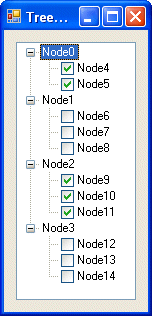
It requires a little bit of code to achieve this effect, but is was worth the effort. Here’s the code that performs the magic:
[code lang=”C#”]
using System.Runtime.InteropServices;
namespace Treeview___CheckBoxes
{
public partial class Form1 : Form
{
public Form1()
{
InitializeComponent();
}
private void Form1_Load(object sender, EventArgs e)
{
// Iterate over the root nodes, removing their checkboxes
for (int n = 0; n
Hi ,
I need to implement similar kind of functinality for my treeview control.
Could you please explain me in little more detail Form_Load function and TVITEM struct.
Thanks in advance
More about the vanilla treeview as implemented via commctrl.h can be found here:
http://msdn.microsoft.com/library/default.asp?url=/library/en-us/shellcc/platform/commctls/treeview/messages/tvm_getnextitem.asp
And TVITEM is explained here:
http://msdn.microsoft.com/library/default.asp?url=/library/en-us/shellcc/platform/commctls/treeview/structures/tvitem.asp
Hi, Craig.
Thank you for this article. I’ve been searching for a solution of specified problem. I’ve tested your code example, it works.
But there is 1 remark: when I select node without checkbox and press bar, checkbox appears again. Should I repeat this procedure on KeyPress event handler, or there is another way?
Thank you in advance
P.S. More precisely, when I select tree node without checkbox and press SPACE bar, checkbox appears again.
Thank you
I suppress the spacebar keydown event to avoid that behaviour, tell me if you find a better solution.
void treeview_KeyDown(object sender, KeyEventArgs e)
{
if (e.KeyCode == Keys.Space)
{
e.SuppressKeyPress = true;
}
}
I really thank you.
I’ve solved the same problem with your code.
Thank you for your help!
I’ve solved the same problem with your code.
Where is the tvi variable in line 25 declared?
Thanks a lot man ..great help
Excellent work. I’ve modified it slightly for my own purposes and it works very well. Thanks for you post and effort.
-Jamie Adams GIS Programmer/Analyst
Awesome.. code works pretty sleek.. i have researching on this issue from quite a while.. thanks a lot..
Can someone please convert this code to VB.NET? I have tried a code converter and it failed.
Thanks
-Matt
Good article, I wrote one to compliment your’s. Kudos.
Bingo!
Just perfect, thanks !
Perfect! Thanks.
You’re awesome!
Works like a charm!! thanks.
Really!!! Amazing peice of code.
You are genious!!!
want to join programmer team to improve my skill and shared it together.
This helped me, thanks!
http://libjoe.blogspot.com
Thanks, works well with me.
I made a recursive function out of it. I can hide one or more spécific levels.
VB.net:
Public Declare Function SendMessage Lib “user32” Alias “SendMessageA” (ByVal hWnd As IntPtr, ByVal Msg As Integer, ByVal wParam As IntPtr, ByVal lParam As IntPtr) As IntPtr
Public Const TVIF_STATE As Integer = &H8
Public Const TVIS_STATEIMAGEMASK As Integer = &HF000
Public Const TV_FIRST As Integer = &H1100
Public Const TVM_SETITEM As Integer = TV_FIRST + 63
Public Structure TVITEM
Public mask As Integer
Public hItem As IntPtr
Public state As Integer
Public stateMask As Integer
Public lpszText As String
Public cchTextMax As Integer
Public iImage As Integer
Public iSelectedImage As Integer
Public cChildren As Integer
Public lParam As IntPtr
End Structure
Function RemoveCheckboxesOnRootNodes() As Boolean
For n = 0 To TV1.Nodes.Count – 1
Dim node As TreeNode = TV1.Nodes(n)
Dim tvItem As New TVITEM
tvItem.hItem = node.Handle
tvItem.mask = TVIF_STATE
tvItem.stateMask = TVIS_STATEIMAGEMASK
tvItem.state = 0
Dim lparam As IntPtr
lparam = Marshal.AllocHGlobal(Marshal.SizeOf(tvItem))
Marshal.StructureToPtr(tvItem, lparam, False)
SendMessage(TV1.Handle, TVM_SETITEM, IntPtr.Zero, lparam)
Next
End Function
It works also under .Net 4.0
Thank you very much!