All posts by Craig Murphy

DDD3 – DATE CHANGE!!!

Due to some football match between England and Paraguay (the result of which will be a 2-1 victory for Paraguay! Place your bets, you heard it here first!), we’ve been forced to move DDD3!

It was on the 10th of June…now it’s on the 3rd of June.

This also means that the 9th through to 11th June are now available: why not hit the Download Festival and catch Metallica playing it large, Lars is on Drums! Man, I am so tempted. Metallica rock.

More details [about DDD3] can be found here:

DDD3 – Call For Speakers – DATE CHANGE!!!

Enjoy!

How to win a by-election…

Perhaps not surprisingly (if you live in the locale) the Scottish Liberal Democrats ousted Labour in the Dunfermline and West Fife by-election. The amount of by-election paraphernalia that came through my letter-box was astounding. Some nights we even got two deliveries from the same party. The paper-recyclers will do well this month.

How did the Lib Dem candidate Willie Rennie overturn a huge Labour majority in what had been a safe Labour seat?

Leaflet drops, and plenty of them. Make sure people don’t and can’t forget your name, that’s the message that came across. And because the general voting public like cartoons, Willie associated himself with Oor Wullie – sometimes 2-box sketches, other times 3-box. Dubious copyright issues appeared to be noted and brushed aside. The quality of the leaflets left a lot to be desired, some even looked as if they were the infamous “copy of a copy of a copy, etc.”…despite this, folks remembered his name and voted for him. I’m glad, because my mind often goes blank when presented with a list of names on a ballot paper…

It’s a sceptical thought, however it’s a tactic that was deployed and worked…it got him 12,391 votes.

Avoid duplication of effort, use technology, increase profit…

QSNews, Friday 13th January 2006 carried, amongst others, a very interesting article in their Comment section: Nobody wants my quantities, by Robert Klaschka of architects and designers Markland Klaschka.

In his article, Robert laments about how Business Information Modelling hasn’t seen the uptake that he feels it deserves. He is particularly annoyed with the amount of repetition that revolves around moving data from its paper source to a useful electronic medium:

legions of architects who find refuge transposing from CAD to spreadsheet there are also battalions of surveyors out there wielding scale rulers

I recall part of a quotation from somebody whose name I cannot remember, it went along the line of this: “you should never have to type in a piece of data more than once” – except the author went to the extreme and cited even the smallest examples as candidates for cut’n’paste (or re-use via whatever means is available). I was young when I read this quote, but even then I knew there was some truth in the quote, when applied in the correct scenarios. Robert’s scenario above is one that I consider appropriate. Over the years, I’ve seen a lot of data being re-entered, being transposed from a paper notebook to a spreadsheet, spreadsheets checked against CAD drawings, even the paper notebooks being checked and checked again. There has to be a better way. There is: make use of information technology, apply it, invest in it, listen to what folks have to say about the successes of information technology. It can save you time, money, make you more efficient, introduce staffing economies and ultimately increase your profit.

Asset Valuation – The Appliance of Science
Given that Radio Frequency ID (RFID) technology is now so economic, there are many firms using RFID tags to simply the data collection during an asset valuation. Performing an asset valuation manually, say for an oil field spanning the entire length and breadth of a country that is 90% desert, can be very costly. It could be even more costly if you have to use senior engineers who know what their are looking for in the way of flare stacks, columns, storage tanks, etc. And it gets worse if different engineers use subtly different terminology to describe the same item. Just think how much time/effort could be saved if RFID tags were attached to various asset items…no longer would we need the senior and expensive engineer jumping in his Dodge for a trip over the desert (we drove Dodge RAMs in the Sahara desert in Libya, other all-terrain vehicles are available).

I plan to write more about the use of RFIDs in future blog posts. In the meantime, there’s a good write up about RFID applications here.

our Dodge
[August 1990: an empty shack in the middle of the Sahara, our Dodge and Jim the driver: far right of the shot – we followed the “tyre route” for a couple of hours, then followed the dunes for a while after the tyres had disappeared, Jim knew where he was going!]

Of course, RFIDs aren’t just useful for desert-based surveys, they’re very useful in more traditional survey environments, such as schools. Since 2003 I’ve been working on and off on a survey application that is used here in the UK. It’s not rocket science, but it works well enough for the client to use our services over and over again. It’s a regular Win32 desktop application written using Delphi 6. We’ve often thought about re-basing the application on a PocketPC device…then we could send the surveyors into the schools armed with a Dell Axim (or similar, other PocketPC devices are available!) to capture the survey data “live”. Even better, add a digital camera to the PocketPC device and the surveyor can take photographs of parts of the school in need of further attention. This has the advantage that we don’t have to send multi-discipline engineers out to survey each and every school. If a surveyor isn’t all that skilled in “costing up” the damage caused by dampness, he can take a photograph of the damage and take it back to the office for a damp-expert to examine. Similarly, if we used RFID tags to identify schools, blocks within schools, rooms within blocks, the amount of data entry can be reduced significantly.
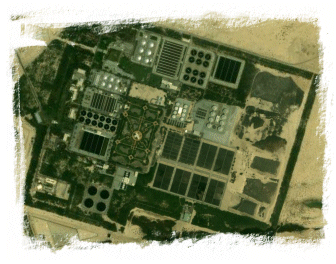
testGoogle are helping us too.

Google Earth is an amazing tool that lets us zoom in on various parts of an oil field – it’s so powerful, we can use it to identity new asset items that weren’t present during the last survey/valuation. Of course, if you know that there are new asset items, you can then improve your estimate of how long the valuation will take and how much it will cost – this tool removes some of the surprises! In some areas of the world, Google Earth is powerful enough to let us read the numbers on airport runways. It’s also powerful enough to provide us with geographical coordinates (latitude and longitude) as well as the elevation at various areas within the image – elevation data can help plan how long a survey might take and may allow some optimisation of routes knowing the precise elevations involved.

For example, on the left [hopefully] you can see a location in the UAE desert. From this image we can gleam a few useful facts. Firstly, has the plant expanded since we last looked at it? A quick visual check will tell us. Secondly, has anything been added or moved around? Thirdly, has anything disappeared? Armed with these basic facts, we can prepare informational reports the on-site surveyors can make good use of. Even if such images are just used as project management tools or site plans (the originals of which are often out of date and/or unavailable), their use can be a great time-saver. As they say, “a picture speaks a thousand words”.

A word of warning however, Google Earth is rather addictive!

Robert’s right in what he says, the importance of technology in today’s non-IT disciplines cannot be understated. If you are lucky enough to have pro-active skilled IT people in your non-IT, shop, see if you can get them working for you, give them a challenge, make them part of the business, listen to their ideas. The synergy that this fusion might yield, could be a catalyst in your business and could see enhanced relationships with your clients, increased turnaround, fewer staff required to complete a job in a shorter space of time…and of course, increased profit as a result of increased efficiency.

Microsoft Word table issue

Last month, a colleague came across an interesting issue with a Microsoft Word table.

Here’s an extract of what he had on his screen:

By  Ester

Notice the regular white space inside the table cells – well, they don’t actually appear in the on-line version of the document or the print preview…only in the printed copy.

So, troubleshooting this, we tried:

  1. a different printer – no change
  2. another different printer, this time a different make – no change
  3. re-applying the shading to the cells – no change

The [quick] solution ended up being as simple as creating a new blank document and a little bit of cut’n’paste.

Has anybody seen a similar issue? Was there a better resolution?

DDD3 – 3rd June 2006 – Save the date!

I’m pleased to announce that DeveloperDeveloperDeveloper returns on the 10th of June 2006!

Once again it will be held at Microsoft’s Thames Valley Park (TVP) campus in Reading, UK.

This is an early announcement and is not a call for speakers – that will take place later in February!

Put the date in your diary, PDA, on your fridge, and keep track of the RSS feed located here:
http://www.developerday.co.uk/ddd/rss.xml

Windows OneCare Live

Following on from my earlier posting…Windows OneCare Live offers a similar service:

This PC health service is always on, running quietly in the background. It helps give you round-the-clock protection and maintenance—virus scanning, firewalls, tune ups, file backups, the whole nine yards. Delivered to you in a smooth, hassle-free package.

Another e-mail scam…

If you receive an e-mail with content similar to this, just delete it:

Hello,

We are planning to include you in the new campus magazine in an article titled “[TOPIC]”. Can you approve the photo and article for us before we go to printing please?

If any details are wrong then we can amend before printing on Wednesday the 1st of February so please get back to us as soon as possible. We have attached the photo and article.

Many Thanks & Best Regards,

It may well have an attachment “photo+article.zip” that contains an executable application – do not under any circumstances, try and run this application. It is a trojan horse.

More details can be found here.

ZEB – Zero E-mail Bounce

I am experimenting with zero e-mail bounce.

Initial results reveal something I already know: my inbox is very full (I have nearly 900 unread e-mails in my primary inbox…a fact my PocketPC device takes great delight in reminding me of every time I switch it on! I won’t tell you about the secondary inbox that’s kept on a different machine…it has e-mail going back 10 years…)

ZEB – it must work, Heather’s doing it, Scott’s doing it, Omar’s doing it, Dan’s doing it, Jonathan’s doing it.

Steps to create your ZEB Search Folder

From Outlook 2003, Click File New…Search Folder…
In the New Search Folder Dialog Box scroll down to the bottom and select “Create a Custom Search Folder”
Select Choose…
Give your Search folder a name like “Email ZEB” and select Criteria
Click the Advanced Tab and add the following
Field: Received, Condition: On or before, Criteria: “Two days ago” (or whatever you want your incoming threshold to be)
Field: Flag Color, Condition: Equals, Criteria: Red Flag
Field: Flag Color, Condition: Equals, Criteria: Yellow Flag
Click OK to save you’re Search Folder
Move the Search Folder to your Folder Favorites
Right click on the ZEB folder and select Properties…and select “Show Total Number of Items”]

ZEB History
30/01/2006: 1811 items in the ZEB folder
31/01/2006: 1612 (train ride to Aberdeen with the PocketPC)
01/02/2006: 797 (big push, big clear-out)
02/02/2006: 413 409 169
05/02/2006: 143
06/02/2006: 67
09/02/2006: 19
11/02/2006: 0 (now, let’s see if I can keep on top of things and keep it in single figures or at zero)

Standard Tools/Applications

I’ll probably extend this list as time goes by, but since a few folks have asked me specifically about backup and hard disk cleaning, I thought I would share my finds here.

For backup, I use Cobian Backup. I’ve been using it for a long time now, it has proven to be the ideal background backup application (also a service).

For hard disk cleaning, I use CCleaner. It’s fully-featured and provides a means of cleaning out virtually everything that is unnessary or not required to keep the PC running. It’ll clear down index.dat files, chkdsk fragments, IIS log files amongst many others.

For “Favourites” and URL management, I use URLBase. At the moment I still use version 5.5 which meets most of my needs. Version 6 does look a lot nicer sporting an Outlook look’n’feel. At €29 (Euros) it’s not too expensive either.

If you’re interested in other goodies worthy of note, Scott makes mention of a whole raft of them here and here.

On another note, via here, Omar has a great tip if you are re-building an operating system install and you use Microsoft Outlook: manually migrate your Outlook Autocomplete history (manual version here).