Further to my earlier post, Scott has released a new version of his SkyDrive plugin for Windows Live Writer.
Technorati Tags: Scott Lovegrove, SkyDrive, Windows Live Writer, WLW
Further to my earlier post, Scott has released a new version of his SkyDrive plugin for Windows Live Writer.
Technorati Tags: Scott Lovegrove, SkyDrive, Windows Live Writer, WLW
On Monday November 26th and 27th, Bob Swart will be here in the UK to teach two courses as part of the Developer’s Group.
Database Development Essentials on Monday November 26th
The agenda is here: http://www.richplum.co.uk/meetings/20071126.pdf
Web Development Essentials on Tuesday November 27th
The agenda is here: http://www.richplum.co.uk/meetings/20071127.pdf
Technorati Tags: Bob Swart, Web Development Essentials, Database Development Essentials, Developers Group, DDG
On Monday October 22nd and 23rd, Ray Konopka will be here in the UK to teach two courses as part of the Developer’s Group.
Effective User Interface Design on Monday October 22nd
The agenda is here: http://www.richplum.co.uk/meetings/20071022.pdf
Effective Programming in Delphi on Tuesday October 23rd
The agenda is here: http://www.richplum.co.uk/meetings/20071023.pdf
Technorati Tags: Ray Konopka, Effective User Interface Design, Effective Programming, Developers Group, DDG
I’m delivering a presentation at NRW07 – it’s a session about Automating the Build Process Using FinalBuilder.
I’m demonstrating a specific product, so you might believe that it’s a “product plug” session that’s full of marketing stuff. Thankfully, nothing could be further from the truth. I’m an avid believer in making things simple – FinalBuilder is one of many products that help me achieve that aim. Therefore, I am demonstrating a useful and highly configurable tool.
FinalBuilder has built-in support for running NUnit tests, so it’s actually remarkably easy to include running tests in your automated build process. However, since FinalBuilder is so feature-rich, I wanted to demonstrate just how easy it is to write some FinalBuilder Actions that run the tests and stop the build if the tests fail. The key take-away from this post is the ease in which FinalBuilder can be customised to incorporate new and or as yet unsupported third party tools.
NUnit has two modes of operation: via a GUI or via the command-line console. Obviously the GUI provides nice visual feedback, red and green bars, etc. The console version is less visually pleasing, but does appeal to the command-line fraternity (which suits me!) Using the command-line version of NUnit (typically found here: C:\Program Files\NUnit 2.4.3\bin\Nunit-Console.exe), you’ll be pleased to know that it will run your tests on your behalf and create as output, create a nicely formatted XML document. That XML document contains two rather useful attributes: total and failures – these indicate the number of tests that were run and the number of failures.
[code lang=”XML”]
[/code]
Clearly we can make use of the failures attribute to our advantage. If it’s zero, then the automated build process can continue on. However, if it has a value of one or more, clearly we have a problem, the build is broken.
Without using FinalBuilder’s built-in NUnit Action, how might we go about incorporating NUnit into our FinalBuilder build process? Thanks to the power of FinalBuilder, it’s actually remarkably easy. Assuming that you have a new, clean FinalBuilder project, here’s what you do:
1. Goto the Tools -> Edit Variables menu, add a new variable called TestFailures.

2. Add a new Execute Program action (from the Windows OS action group). Set the Program File input box to point to nunit-console.exe. In the Parameters input box, enter the name of the DLL that contains your NUnit tests. In the Start In input box, enter the full path to the directory where the DLL that contains your tests can be found.

3. Add a new Define XML Document action (from the XML action group). Call the XML document TestResults. Set the Load document from file input box – set it to the TestResults.xml file that sits alongside the DLL that contains your tests. This assumes that you have either places an empty TestResults.xml file in that folder or you have run your tests through the NUnit Console prior to this exercise.

4. Add a new Read XML Value to Variable action. Set the XPath to Node equal to //test-results. Put a tick in the Read attribute check-box, set it equal to failures. From the Variable to Set drop-down menu, set it to TestFailures.

5. Add an If..Then action (from the Flow Control action group). Set the Left-hand Term equal to %TestFailures% – there is code completion to help you. Set the operator equal to “greater than”, i.e. >

6. Run your FinalBuilder project. If all goes well, i.e. the tests pass, the screenshots below should look familiar. Otherwise, if the tests fail, the whole build process fails.


This short example demonstrates the power of FinalBuilder – whilst there is a built-in action for running NUnit projects, this example has served to demonstrate how easy it is to integrate a third party tool into the FinalBuilder build process. Hopefully this short example has been enough to convince you that FinalBuilder can be used to integrate virtually any “build activity” that you may have in your process.
How are you carrying out your build process at the moment? Is it automated? Harness the power of the fully automated build!
Resources
http://www.finalbuilder.com
http://www.nunit.org
Technorati Tags: FinalBuilder, TDD, NUnit, automating the build process, automated builds, VSoft
.NET Internationalization
Author: Guy Smith-Ferrier
Publisher: Addison Wesley
ISBN: 0-321-34138-4
Pages: 636
URL: http://snipurl.com/dotneti18n
First Impressions
With the reach of the Internet today, “local” is taking on a new meaning. Today’s business is increasingly being conducted in a global, multi-lingual and multi-cultural environment. As software developers, the concept of internationalisation (a word which, ironically, is itself spelt differently within the English speaking community) and indeed localisation is something we need to be more than aware of. However, it’s a topic that attracts a lot of attention, yet few have written about in such depth as Guy Smith-Ferrier. Indeed, in my experience, a lot of authors who attempt to cover internationalisation have, despite best efforts, sent their intended readers into a comatose state – internationalisation as a topic is perhaps not the most exciting topic to choose to read about! However, I’m pleased to report that Guy manages to inject enough humour and witty anecdotes such that as a reader, I was kept interested.
Continue reading Guy Smith-Ferrier’s .NET Internationalization Book
The Company
Xceliant Scotland
The Job
We are looking to build a network of contractors for our SimpleWeb.net Enterprise Social Network platform. This is part of our new venture being set up in Dundee in the last quarter of 2007.
Key skills required are:
1. C#, ASP.NET, MS Visual Studio .NET
2. MS SQL Server, Windows Server
3. AJAX, JavaScript
4. User Experience Design
Further Information
Ian Smith
CEO
Xceliant Limited
e: ian DOT smith AT xceliant DOT com
t: 0131 718 6056
m: 07785 264 0957
Technorati Tags: Xceliant Limited, Xceliant, job, .net job, Scottish Jobs
I have been a fan of regular expressions for a long time now.
Regular expressions provide a concise and flexible notation for matching and replacing patterns of text within a body of text. Some might say that regular expressions are concise and cryptic, perhaps because most regular expressions are built from a combination of metacharacters such as ^$*+?. The actual regular expression itself is known as a pattern.
They are, in my opinion, very much underused. Perhaps they are a visual turn off? After all, looking at this regular expression…
([a-zA-Z0-9_\-\.]+)@((\[[0-9]{1,3}\.[0-9]{1,3}\.[0-9]{1,3}\.)|(([a-zA-Z0-9\-]+\.)+))([a-zA-Z]{2,4}|[0-9]{1,3})
…and it’s no wonder people don’t use them as much as they should.
However, there is a plethora of good web-sites that list common regular expressions thus relieving us of the need to type them in manually. Equally there are many good tools that will help us build regular expressions using a pleasing visual interface…after which it’s typically a matter of cut’n’paste.
—
A few months ago I had to write a little application that scraped the HTML that makes up a web-page. I needed to extract all the e-mail addresses that were in the HTML – it was all legit, the e-mail addresses were made available to registered organisations (of which we are one) – it was just a shame that the sheer number of e-mail addresses didn’t lend itself to a mailshot. That was, until I wrote a few lines of code that used a pre-defined regular expression to extract all the e-mail addresses, formatting them nicely on the way.
The application worked by asking the user to paste the HTML source code from the web-page that contained the e-mail addresses, albeit they were embedded withing anchor tags. The user could then run the regular expression over the HTML source code – a treeview of the matches appears on the right-hand side and a neatly textbox appears at the bottom. Here’s a screenshot of the application:

Here’s the source code:
[code lang=”C#”]
[C#]
using System.Text.RegularExpressions;
namespace HTML_Scraper
{
public partial class Extractor : Form
{
public Extractor()
{
InitializeComponent();
}
private void btnProcess_Click(object sender, EventArgs e)
{
Boolean found = false;
lblMessage.Visible = false;
Match m;
Regex r = new Regex(tbRegEx.Text,
RegexOptions.IgnoreCase
| RegexOptions.CultureInvariant
| RegexOptions.IgnorePatternWhitespace
| RegexOptions.Compiled
);
tvTree.Nodes.Clear();
this.Cursor = Cursors.WaitCursor;
for (m = r.Match(tbSource.Text); m.Success; m = m.NextMatch())
{
if (m.Value.Length > 0)
{
found = true;
tvTree.Nodes.Add(“[” + m.Value + “]”);
if (tbOutput.Text.Length > 0) { tbOutput.Text = tbOutput.Text + “, “; }
tbOutput.Text = tbOutput.Text + m.Value;
int ThisNode = tvTree.Nodes.Count – 1;
tvTree.Nodes[ThisNode].Tag = m;
if (m.Groups.Count > 1)
{
for (int i = 1; i < m.Groups.Count; i++)
{
tvTree.Nodes[ThisNode].Nodes.Add(r.GroupNameFromNumber(i) + ": [" + m.Groups[i].Value + "]");
tvTree.Nodes[ThisNode].Nodes[i - 1].Tag = m.Groups[i];
int Number = m.Groups[i].Captures.Count;
if (Number > 1)
{
for (int j = 0; j < Number; j++)
{
tvTree.Nodes[ThisNode].Nodes[i - 1].Nodes.Add(m.Groups[i].Captures[j].Value);
tvTree.Nodes[ThisNode].Nodes[i - 1].Nodes[j].Tag = m.Groups[i].Captures[j];
}
}
}
}
}
}
if (found)
{
tbOutput.SelectAll();
Clipboard.SetText(tbOutput.Text);
lblMessage.Visible = true;
}
this.Cursor = Cursors.Default;
}
private void btnGetText_Click(object sender, EventArgs e)
{
tbSource.Text = "";
tbSource.Text = Clipboard.GetText();
}
private void textBox1_TextChanged(object sender, EventArgs e)
{
btnProcess.Enabled = (tbSource.Text.Length > 0);
}
private void btnEmail_Click(object sender, EventArgs e)
{
tbRegEx.Text = @”([a-zA-Z0-9_\-\.]+)@((\[[0-9]{1,3}\.[0-9]{1,3}\.[0-9]{1,3}\.)|(([a-zA-Z0-9\-]+\.)+))([a-zA-Z]{2,4}|[0-9]{1,3})”;
}
}
}
[/code]
As long as you don’t get too boiled down in the actual regular expression itself, the code is fairly self-explanatory.
A simple example
Consider the following strings: A123, 234, C456. I’ve deliberately missed the ‘B’ from the second string.It would be useful to be able to scan these strings to pick out strings similar to A123, i.e. an alphabetic character, followed by some numeric content. Alphabetic characters are represented using character sets enclosed in square brackets. Assuming the alphabetic character was allowed a range of A through to Z, we could represent this set like this: [A-Z]. Numeric sets work in the same way; the range 0 to 9 is the pattern [0-9]. Thus given the pattern [A-Z][0-9]+, we can match the two strings A123 and C456.
If we augmented the strings to be A123, B234, C345, we could use the pattern [A,C][0-9]+ to match A123 and C345, to give us the same result.
Resources:
http://www.regular-expressions.info/
http://regexlib.com/
Tools:
http://www.regular-expressions.info/regexbuddy.html
http://www.editpadpro.com/
Via Search Engines:
http://search.live.com/results.aspx?q=REGULAR+EXPRESSIONS&src=IE-SearchBox
http://www.google.co.uk/search?hl=en&q=REGULAR+EXPRESSIONS&meta=
Technorati Tags: regex, regular expressions, html scraping, html scraper, scraping, e-mail address extraction
In a recent forum posting, I found myself writing some code that would open the Visual Studio 2005 Command Prompt (C:\Program Files\Microsoft Visual Studio 8\VC\vcvarsall.bat). Once opened, the command prompt had to accept command-lines, just as if they were typed in by the user…except in this case it had to be under program control!
I’m sure that there are many ways of doing this, but here’s what I ended up with:
[code lang=”C#”]
[C#]
using System.Diagnostics;
using System.IO;
namespace Cmd
{
public partial class Form1 : Form
{
public Form1()
{
InitializeComponent();
}
private void button1_Click(object sender, EventArgs e)
{
string sProcess = @”C:\windows\system32\cmd.exe”;
string sParam = @”C:\Program Files\Microsoft Visual Studio 8\VC\vcvarsall.bat”;
string cmd = String.Format(” /k {0}{1}{2} x86″, “\””, sParam, “\””);
Process p = new Process();
p.StartInfo.RedirectStandardInput = true;
p.StartInfo.RedirectStandardOutput = true;
p.StartInfo.UseShellExecute = false;
p.StartInfo.FileName = sProcess;
p.StartInfo.Arguments = cmd;
p.Start();
System.IO.StreamReader sOut = p.StandardOutput;
StreamWriter myStreamWriter = p.StandardInput;
myStreamWriter.WriteLine(“dir”); // Your command line, MSBuild, etc.
myStreamWriter.WriteLine(“EXIT”);
MessageBox.Show(sOut.ReadToEnd());
p.Close();
}
}
}
[/code]
I’ve left the call to MessageBox.Show() to make you aware of the output.
Technorati Tags: .net command prompt, C:\Program Files\Microsoft Visual Studio 8\VC\vcvarsall.bat, vcvarsall.bat, RedirectStandardInput, RedirectStandardOutput, StandardOutput, StandardInput, StartInfo, Process, Visual Studio 2005 Command Prompt
I have been receiving a few requests for my now elderly Delphi XML/XPath examples to be brought into the world of .NET. Similarly, I have seen a lot of newsgroup posts about using XML and XPath expressions, particularly those XPath expressions that can be used to “query” the XML “database”.
The most popular request seems to have been for my “employee” selector demonstration:
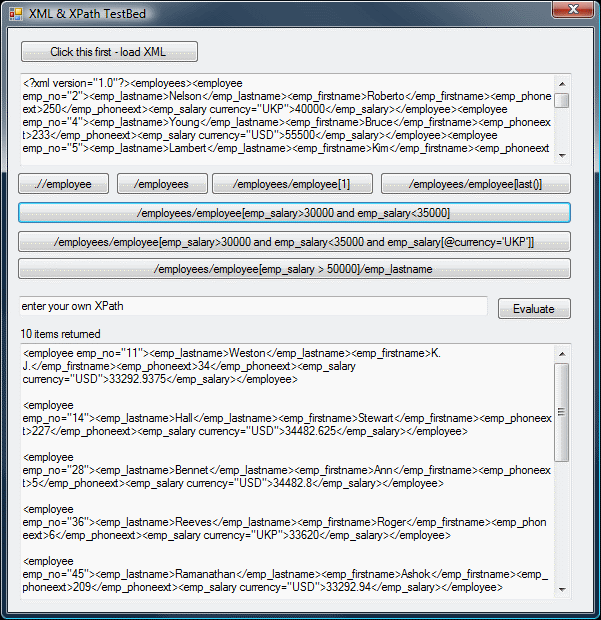
It’s a small application that lets you load some XML (employee data) into an XML document. It then lets you fire a handful of XPath expressions at the XML document via the use of the SelectNode methods. It demonstrates selecting specific employees using a combination of conditions; there’s a mixture of XPath that looks at element values and one that looks at an attribute value. I’ve revamped it slightly, noteably I’ve made a few minor changes to bring it into line with current W3C standard (as enforced by .NET’s SelectNodes method).
[code lang=”XML”]
[XML]
…
[/code]
[code lang=”C#”]
[C#]
using System;
using System.Collections.Generic;
using System.ComponentModel;
using System.Data;
using System.Drawing;
using System.Text;
using System.Windows.Forms;
using System.Xml;
namespace XML
{
public partial class Form1 : Form
{
XmlDocument doc;
public Form1()
{
InitializeComponent();
}
private void button1_Click(object sender, EventArgs e)
{
doc = new XmlDocument();
doc.Load(“employees.xml”);
textBox1.Text = doc.OuterXml;
}
private void handle_xpath(String xPathExpression)
{
XmlNodeList result;
XmlNode root = doc.DocumentElement;
result = root.SelectNodes(xPathExpression);
label1.Text = String.Format(“{0} items returned”, result.Count);
textBox3.Clear();
foreach (XmlNode x in result)
{
textBox3.Text = textBox3.Text + x.OuterXml + Environment.NewLine + Environment.NewLine;
}
}
private void button2_Click(object sender, EventArgs e)
{
handle_xpath(“.//employee”);
}
private void button3_Click(object sender, EventArgs e)
{
handle_xpath(“/employees”);
}
private void button4_Click(object sender, EventArgs e)
{
handle_xpath(“/employees/employee[1]”);
}
private void button5_Click(object sender, EventArgs e)
{
handle_xpath(“/employees/employee[last()]”);
}
private void button6_Click(object sender, EventArgs e)
{
handle_xpath(“/employees/employee[emp_salary>30000 and emp_salary<35000]");
}
private void button7_Click(object sender, EventArgs e)
{
handle_xpath("/employees/employee[emp_salary>30000 and emp_salary<35000 and emp_salary[@currency='UKP']]");
}
private void button8_Click(object sender, EventArgs e)
{
handle_xpath("/employees/employee[emp_salary > 50000]/emp_lastname”);
}
private void button9_Click(object sender, EventArgs e)
{
handle_xpath(textBox2.Text);
}
}
}
[/code]
The source code is available here [60k].
There’s a short 60 second movie of the application in use here [748kb]. Courtesy of TechSmith’s Camtasia.
Technorati Tags: XML, XPath, C#, C-Sharp, SelectNodes, VS2005, Visual Studio 2005, Visual C# Express, Camtasia, TechSmith
Security expert, Chris Seary has written a thought-provoking piece about the changing role of the Database Administrator (DBA) now that database querying is becoming a feature in many .NET programming languages, via the use of Language INtegrated Query (LINQ). With developers writing code that effectively reaches into the database, it does present developers and DBAs with a cause for concern, especially where performance might be an issue. Chris discusses this problem and lays down the foundation for what it likely to be considered a future best practice.
On another note, Chris is now an independent consultant. If you need a security expert, give Chris a call. Check out his MSDN articles and slide decks. Chris recently spoke at DDD5 to a full-house, deliverying a good overview of his ‘Ten Top Tips for Securing Web Applications’.
Technorati Tags: Chris Seary, Chris Seary Computing, LINQ, Securing LINQ, DDD5
DeveloperFusion have published my Improving Application Quality Using Test-Driven Development (TDD) article over here.
The article is aging a little, but it demonstrates the main points. I’m planning to spend some time bringing my legacy content up to date, I’ll post an entry here as and when they do become available – watch this feed!
Technorati Tags: developerfusion, TDD
23/06/2010 UPDATE
The database publishing wizard is integrated within Visual Studio 2008/2010.Further information can be found here.
As you might well imagine, the on disk structure for SQL Server 2005 differs from that of SQL Server 2000.
Indeed, restoring a SQL Server 2005 [Express] database backup for use with SQL Server 2000 isn’t really the done thing, as this post confirms.
After a little head-scratching with the SQL Server 2005 Express data export and scripting options, I deemed it necessary to create a SQL script that was not only capable of creating the database structure, but was also able to create all the INSERT statements necessary to recreate the data too. And it had to create SQL suitable for SQL Server 2000’s dialect…
Further head-scratching led me to the Microsoft SQL Server Database Publishing Wizard. It does exactly what I needed and allowed me to move a SQL Server 2005 database back down to SQL Server 2000, as these screenshots confirm:
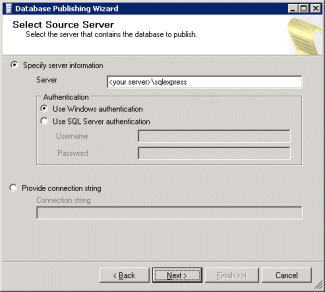


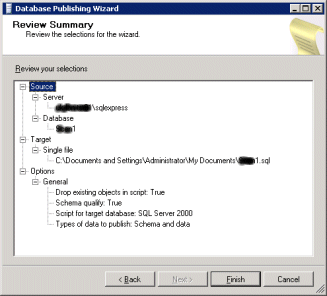
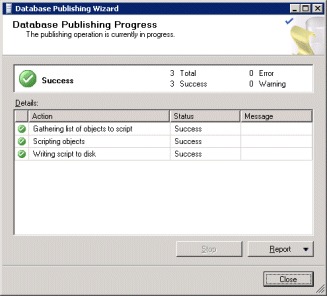
So, in a nutshell, here’s what I did:
Of course, there’s often more than one way to skin a cat, your mileage may vary.
Technorati Tags: SQL Server, SQL Server 2005, SQL Server 2000, SQL Server 2005 Express, data migration, SQL Script, schema and data