All posts by Craig Murphy

The Next Generation User Group

UserGroup

John Price, Dave McMahon and Richard Costall would like to announce the formation of a new User Group called The Next Generation User Group (known as NxtGenUG). The purpose of the User Group is to help its members discover and get excited about all the latest and new technologies coming out of Microsoft such as .NET 2.0, SQL Server 2005, WPF, WCF, WF, LINQ, Office 12 and .NET 3.0.

It doesn’t matter what development language is your language of choice, and we will also be covering techniques and technologies currently out there which people are using now. Our first meeting is on 8th May at the Coventry Flying Club. It’s going to be informative and fun, with great speakers from the community and Microsoft and competitions and prizes every month!

So make a note of the URL: http://www.nxtgenug.net Register with the site and come and join the fun. Membership rates are extremely competitive, and anyone who attended the VBUG launch extravaganza last November will know what to expect.

Check out some of the early content – including a rare interview with Soma Somasegar – Vice President of the developer division at Microsoft in Redmond and an excellent interview with Marcus Perryman – Mr Mobile Devices.

We are really excited about this and i hope you are to… its only version 1.0 of the site and we have SO MUCH MORE TO COME!

Fasten your seatbelts – NxtGenUG is clear for take-off!
Trivial: Binary To Integer

In response to a web-forum question, I found myself writing a little C# to convert from a string (containing a binary number) into the integer representation of the same. It’s the kind of trivial coding problem that first year programmers would come up against… Of course, we could make it harder by stipulating that we cannot use System.Convert.

I’m sure that there are much better ways of doing this, and I’d be glad to see some of them appear in the comments for this post. There, a kind of challenge…If the quality of the comments is good enough, I might be able to offer a small prize if you are a UK resident. No promises though!

[code lang=”C#”]
public int BinToInt(string binaryNumber)
{
int multiplier = 1;
int converted = 0;

for (int i = binaryNumber.Length – 1; i >= 0; i–)
{
int t = System.Convert.ToInt16(binaryNumber[i].ToString());
converted = converted + (t * multiplier);
multiplier = multiplier * 2;
}
return converted;
}
[/code]

In use:

[code lang=”C#”]
// remember SEFTU, sixteen, eight, four, two, one
listBox1.Items.Add(BinToInt(“00001”).ToString()); // 1
listBox1.Items.Add(BinToInt(“00010”).ToString()); // 2
listBox1.Items.Add(BinToInt(“00011”).ToString()); // 3
listBox1.Items.Add(BinToInt(“00100”).ToString()); // 4
listBox1.Items.Add(BinToInt(“00101”).ToString()); // 5
listBox1.Items.Add(BinToInt(“00111”).ToString()); // 7
listBox1.Items.Add(BinToInt(“01000”).ToString()); // 8
listBox1.Items.Add(BinToInt(“10000”).ToString()); // 16[/code]

It might be of use to somebody…somewhere…

DDD3 – Voting Closed

Last Friday saw us close the voting for DeveloperDeveloperDeveloper 3 sessions.

I’ve just made the first pass at the agenda and it looks like, based on the votes, that we’ll have 25 sessions this time around.

I can’t reveal the sessions just yet, but will post them here as soon as we finalise them…which will be within days rather than weeks.

Thanks to all who voted, you shaped the agenda, it was truly a community for the community operation!

Selectively removing checkboxes in a .NET 1.1 / 2.0 TreeView

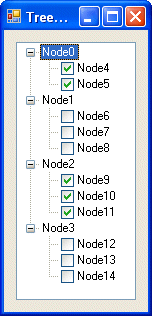
Earlier this month, I had the need to customise a TreeView control such that it had checkboxes against some, not all, of the nodes.

Here’s a screenshot of what I wanted:

Treeview

It requires a little bit of code to achieve this effect, but is was worth the effort. Here’s the code that performs the magic:

[code lang=”C#”]
using System.Runtime.InteropServices;

namespace Treeview___CheckBoxes
{
public partial class Form1 : Form
{
public Form1()
{
InitializeComponent();
}

private void Form1_Load(object sender, EventArgs e)
{
// Iterate over the root nodes, removing their checkboxes
for (int n = 0; nTechnorati Tags: , , ,

GSOH at The Code Project

It’s good to see that the folks over at The Code Project have a sense of humour! I came across the message below whilst browsing their site.

Oops!
Hear that crunching sound? Something just broke.

Why did this happen?
Because either we screwed up in a way that wasn’t immediately obvious until now, or because the ASP engine running this site has just rolled over and died, or because the site is simply having a bad hair day.

Options
Try and do whatever you did again. Try again.

Open the CodeProject home page, and then look for links to the information you want. Sure, the information you need is probably on this page, but you never know your luck in a big city.
Pray, curse, or sacrifice burnt offerings, then see 1.

The Error
The Page: : /vb/net/CustomDrawTreeview.asp
The Time: : Sunday, April 09, 2006, 1:19:58 PM
The Server: : Web09
The Error No. : 0x80004005. Remember this number. There will be a test.
The Category : Microsoft VBScript compilation

Microsoft Technical Roadshows 2006

It’s that time of year again – Microsoft hit the road!

Join Microsoft at their 2006 Technical Roadshows across the UK, save these dates:

Technet
02/05/06 Birmingham National Motor Cycle Museum
22/05/06 Edinburgh Dynamic Earth
06/06/06 Manchester Manchester Conference Centre
15/06/06 London (City) Immarsat Centre
21/06/06 Bristol The Watershed

MSDN
03/05/06 Birmingham National Motor Cycle Museum
23/05/06 Edinburgh Dynamic Earth
07/06/06 Manchester Manchester Conference Centre
14/06/06 London (City) Immarsat Centre
20/06/06 Bristol The Watershed

Edinburgh attendees – please note the change of venue: these events are not being held in The Corn Exchange!

Register via here.

C# lists: add some elegance to your code

It is a fairly common programming scenario to find ourselves with a list of identical objects. In the past, without adequate support from programming languages, we found ourselves writing a lot of searching and sorting code, and that may have put you off using lists in favour of arrays. All that has changed with C# (particularly 2.0) – its implementation of a list makes handling such lists remarkably easy.

For example, given the following class Person:

[code lang=”C#”]
public class Person
{
public int age;
public string name;

public Person(int age, string name)
{
this.age = age;
this.name = name;
}
}
[/code]

We can create a list of Person objects and add six people like so:

[code lang=”C#”]
Listpeople = new List();

people.Add(new Person(50, “Fred”));
people.Add(new Person(30, “John”));
people.Add(new Person(26, “Andrew”));
people.Add(new Person(24, “Xavier”));
people.Add(new Person(5, “Mark”));
people.Add(new Person(6, “Cameron”));
[/code]

C#’s list mechanism provides us with a number of useful methods. Personally, I find ForEach, FindAll and Sort to be very useful. ForEach allows us access to each item in the list. FindAll allows us to search for objects in the list that match a specific condition. Sort allows us to sort the objects in the list. The following code demonstrates how we might use each of these methods:

[code lang=”C#”]

Console.WriteLine(“Unsorted list”);

people.ForEach(delegate(Person p)
{ Console.WriteLine(String.Format(“{0} {1}”, p.age, p.name)); });

// Find the young
List young = people.FindAll(delegate(Person p) { return p.age < 25; }); Console.WriteLine("Age is less than 25"); young.ForEach(delegate(Person p) { Console.WriteLine(String.Format("{0} {1}", p.age, p.name)); }); // Sort by name Console.WriteLine("Sorted list, by name"); people.Sort(delegate(Person p1, Person p2) { return p1.name.CompareTo(p2.name); }); people.ForEach(delegate(Person p) { Console.WriteLine(String.Format("{0} {1}", p.age, p.name)); }); // Sort by age Console.WriteLine("Sorted list, by age"); people.Sort(delegate(Person p1, Person p2) { return p1.age.CompareTo(p2.age); }); people.ForEach(delegate(Person p) { Console.WriteLine(String.Format("{0} {1}", p.age, p.name)); }); [/code] And here is the output that we should expect: Unsorted list
50 Fred
30 John
26 Andrew
24 Xavier
5 Mark
6 Cameron

Age is less than 25
24 Xavier
5 Mark
6 Cameron

Sorted list, by name
26 Andrew
6 Cameron
50 Fred
30 John
5 Mark
24 Xavier

Sorted list, by age
5 Mark
6 Cameron
24 Xavier
26 Andrew
30 John
50 Fred

Lists are powerful and result in fewer, and more elegant, lines of code. Hopefully this short example has demonstrated their ease and you will find yourself using them in your day-to-day development activities.

interoute sent me a new tie!

tie.gif

Those nice folks over at interoute sent me a super new tie! Thanks folks!

I don’t really know what I did to deserve it, but hey, it’s my kinda tie!

Actually, they sent it to my previous employer: one of my former colleages was kind enough to give me a call to arrange collection! If anyone from interoute picks up on this, send me an e-mail via this web-site and we can sort out a new address!

DDD3 – Session voting opens

ddd3.gif

I am pleased to announce that you may now vote for those sessions that you would like to see on the DeveloperDeveloperDeveloper 3 agenda!

There’s a great line up of speakers available to choose from – some of whom are travelling from further afield to be here! And it sees the return of some familiar speakers, such as Steve Scott.

I have submitted a session, Unit Testing and Code Coverage: Putting it all together, here’s the abstract:

With Test-Driven Development (TDD) now entering the mainstream via such tools as NUnit and more recently Visual Studio 2005 Team System (VSTS), you may be wondering how to “get more” from TDD. I believe that we can improve the quality of our application by using a combination of TDD and code coverage.

Code coverage, whereby we “track” how much of our code is covered during testing, is not new. Indeed, we can practice code coverage and TDD in isolation. However, applying what we know about code coverage against our unit tests allows us to move our applications to the next “quality” level:
no longer is it acceptable to have unit tests on their own, we must know how well written the unit tests are, how much of the classes under test are really being tested?

Over the course of 60 minutes I will introduce the benefits of code coverage using both manual methods and automated tools. I will briefly introduce TDD and will go on to demonstrate the benefits of using code coverage tools against your unit tests, i.e. how well do your tests exercise your classes/application?

Whilst I will be using Visual Studio 2005 and C#, I will discuss Visual Studio 2003 compatibility too. I will be looking at a handful of the code coverage tools that are available, both free and commercial.

If you would like to see this session, please vote for it! And if there’s anything you would like me to cover in this session, please feel free to send me an e-mail or leave a comment here!

Upgraded to WordPress 2.02

After deliberating for a month or two, I’ve finally upgraded this blog to WordPress 2.02. A Spam Karma upgrade was applied too.

One thing I would note, and this is a point well made elsewhere, if you are using Google AdSense make sure that your AdSense code is protected from WordPress’s new Preview feature. Easily achieved using something similar to this (lines 1 and 9 are the lines to look out for):

[code lang=”PHP”]
< ?php global $wp_query; if (!$wp_query->is_preview): ?>